The keyboard is a basic input device that is used to enter data into a computer or any other electronic device by pressing keys. It has different sets of keys for letters, numbers, characters, and functions. Keyboards are connected to a computer through USB or a Bluetooth device for wireless communication.
कीबोर्ड
कंप्यूटर का एक प्रमुख इनपुट डिवाइस है, इसे प्राइमरी इनपुट डिवाइस भी कहते हैं. आप सभी लोग इस इनपुट डिवाइस के बारे में जानते ही होंगे.
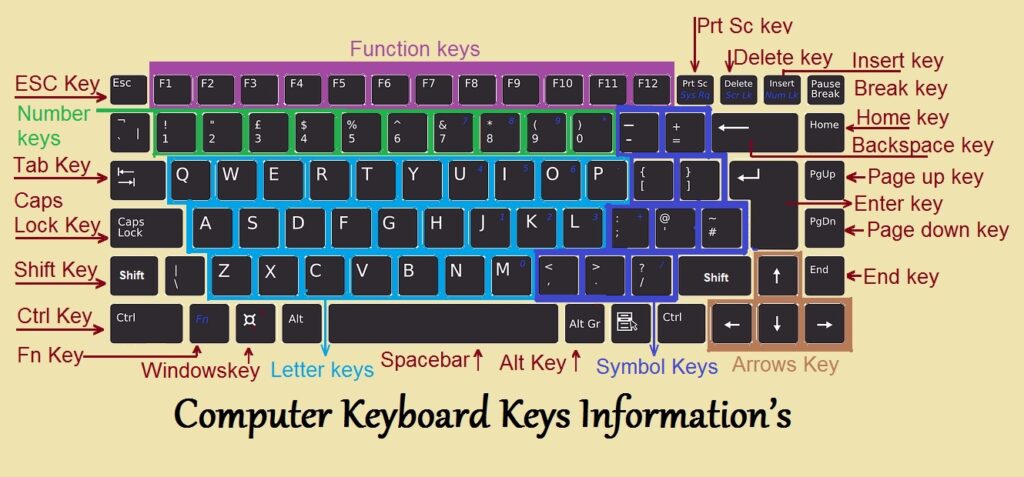
इसमें लगभग 108 Key होती है, कीबोर्ड के द्वारा कंप्यूटर को Typing करके Instruction देते हैं. कीबोर्ड में कई प्रकार की Key होती है जैसे Alphabetic Key ( A To Z ), Numeric Key ( 0 – 9 ), Symbolic Key ( @,#,&,% ), 4 Arrow Key, Function Key ( F1 To F12 ) और कुछ विशेष प्रकार की Key ( Atl, Tab, Ctrl ). इन सभी Key के द्वारा कंप्यूटर पर साधारण से लेकर विशेष प्रकार के कार्य कर सकते हैं. कीबोर्ड एक महत्वपूर्ण इनपुट डिवाइस है
Types of keyboards: There can be different types of keyboards based on the region and language used. Some of the common types of keyboards are as follows:
i) QWERTY Keyboard:
QWERTY Keyboard:
It is the most commonly used keyboard with computers in modern times. It is named after the first six letters of the top row of buttons and is even popular in countries that do not use Latin-based alphabet. It is so popular that some people think that it is the only type of keyboard to use with computers as an input device.
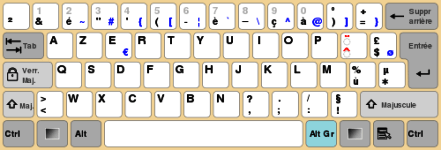
ii) AZERTY Keyboard:
ii) AZERTY Keyboard:
It is considered the standard French keyboard. It is developed in France as an alternative layout to the QWERTY layout and is mainly used in France and other European countries. Some countries have manufactured their own versions of AZERTY.
Its name is derived from the first six letters that appear on the top left row of the keyboard. The Q and W keys in AZERTY keyboard are interchanged with A and Z keys in QWERTY keyboard. Furthermore, in AZERTY keyboard M key is located to the left of the L key.
AZERTY keyboard differs from QWERTY keyboard not only in the placement of letters but also in many other ways, e.g., it gives emphasis on accents, which is required for writing European languages like French.
iii) DVORAK Keyboard:
iii) DVORAK Keyboard:
This type of keyboard layout was developed to increase the typing speed by reducing the finger movement while typing. The most frequently used letters are kept in a home row to improve typing.
Listing of non-alphanumeric keys
Key/symbol
Explanation
Windows
PC keyboards have a Windows key that looks like a four-pane, wavy window.
Command
Apple Mac computers have a Command with a symbol resembling a cloverleaf.
Menu
PC keyboards also have a Menu key that looks like a cursor pointing to a menu.
Esc
Esc (escape) key.
F1 – F12
What are the F1 through F12 keys?
F13 – F24
Information about the F13 through F24 keyboard keys.
Tab
Tab key.
Caps lock
Caps lock key.
Shift
Shift key.
Ctrl
Control key.
Fn
Function key.
Alt
Alternate key (PC only; Mac users have an Option key).
Spacebar
Spacebar key.
Arrows
Up, down, left, right Arrow keys.
Back Space
Back space (or Backspace) key.
Delete
Delete or Del key.
Enter
Enter key.
Prt Scrn
Print Screen key.
Scroll Lock
Scroll Lock key.
Pause
Pause key.
Break
Break key.
Insert
Insert key.
Home
Home key.
Page up
Page up or pg up key.
Page down
Page down or pg dn key.
End
End key.
Num Lock
Num Lock key.
~
Tilde.
`
Acute, back quote, grave, grave accent, left quote, open quote, or a push.
!
Exclamation mark, exclamation point, or bang.
@
Ampersat, arobase, asperand, at, or at symbol.
#
Octothorpe, number, pound, sharp, or hash.
£
Pound Sterling or Pound symbol.
€
Euro.
$
Dollar sign or generic currency.
¢
Cent sign.
¥
Chinese/Japanese Yuan.
§
Micro or section.
%
Percent.
°
Degree.
^
Caret or circumflex.
&
Ampersand, epershand, or and symbol.
*
Asterisk, mathematical multiplication symbol, and sometimes called a star.
(
Open or left parenthesis.
)
Close or right parenthesis.
–
Hyphen, minus, or dash.
_
Underscore.
+
Plus.
=
Equal.
{
Open brace, squiggly brackets, or curly bracket.
}
Close brace, squiggly brackets, or curly bracket.
[
Open bracket.
]
Closed bracket.
|
Pipe, or, or vertical bar.
\
Backslash or reverse solidus.
/
Forward slash, solidus, virgule, whack, and mathematical division symbol.
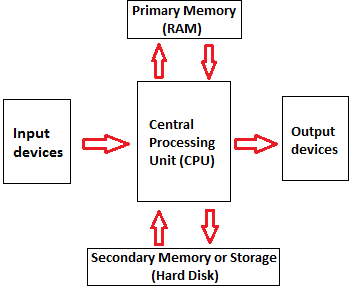
Input device enables the user to send data, information, or control signals to a computer. The Central Processing Unit (CPU) of a computer receives the input and processes it to produce the output.
कंप्यूटर के इनपुट डिवाइस वे पार्ट होते हैं जिनके द्वारा हम कंप्यूटर को निर्देश देते हैं कि उसे क्या करना है, जैसे कीबोर्ड, माउस. स्कैनर आदि |
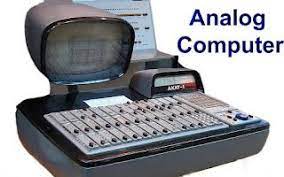
Analogue computers are designed to process analogue data. Analogue data is continuous data that changes continuously and cannot have discrete values. We can say that analogue computers are used where we don’t need exact values always such as speed, temperature, pressure and current.
Analogue computers directly accept the data from the measuring device without first converting it into numbers and codes. They measure the continuous changes in physical quantity and generally render output as a reading on a dial or scale. Speedometer and mercury thermometer are examples of analogue computers.Play Video
एनालॉग कंप्यूटर ऐसे कंप्यूटर होते हैं जिनका उपयोग भौतिक मात्राओं को मापने के लिए किया जाता है। भौतिक राशियाँ जैसे तापमान, दबाव, लंबाई, ऊँचाई आदि।
एनालॉग कंप्यूटर का उपयोग कार्यालयों या घरों में नहीं किया जाता है, इनका उपयोग ज्यादातर चिकित्सा या विज्ञान के क्षेत्र में किया जाता है, जैसे कि थर्मामीटर। एनालॉग कंप्यूटर हमारे सामने आउटपुट दिखाने के लिए एनालॉग सिग्नल का उपयोग करते हैं।
एनालॉग कंप्यूटर में मेमोरी या स्टोरेज नहीं होती है, यानी वे पिछले डेटा को स्टोर नहीं करते हैं। जैसे आप थर्मामीटर से बुखार को मापते हैं, हर बार यह शरीर के तापमान के आधार पर शुरू से ही बुखार को मापता है। यानी इनपुट सिग्नल में बदलाव के साथ एनालॉग कंप्यूटर का आउटपुट भी बदलता रहता है।
2) Digital Computer
Digital Computer
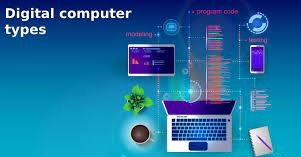
Digital computer is designed to perform calculations and logical operations at high speed. It accepts the raw data as input in the form of digits or binary numbers (0 and 1) and processes it with programs stored in its memory to produce the output. All modern computers like laptops, desktops including smartphones that we use at home or office are digital computers
डिजिटल कंप्यूटर (Digital Computer) वह डिजिटल सिस्टम है जो विभिन्न तरह की कई कम्प्यूटेशनल कार्य करता है। डिजिटल शब्द का मतलब है कि कंप्यूटर में जानकारी को Variables द्वारा दर्शाना, जो की ये सीमित संख्या होती हैं और कंप्यूटर शब्द का मतलब है कि, संगणक या गणना करना, इसलिए आम भाषा मे इसे कैल्कुलेटिंग डिवाइस माना जाता है। डिजिटल कंप्यूटर में Input तौर पर दिए गए Details को डाटा कहा जाता है। डिजिटल कंप्यूटर से प्राप्त आउटपुट परिणाम को अक्सर सूचना या जानकारी कहा जाता है। डिजिटल कंप्यूटर Input डाटा लेता है, तब इसे प्रोसेस करता है इसके बाद सूचना या परिणाम को आउटपुट डिवाइस पर दिखाता है।
3) Hybrid Computer
hybrid computer
Hybrid computer has features of both analogue and digital computer. It is fast like an analogue computer and has memory and accuracy like digital computers. It can process both continuous and discrete data. It accepts analogue signals and convert them into digital form before processing. So, it is widely used in specialized applications where both analogue and digital data is processed. For example, a processor is used in petrol pumps that converts the measurements of fuel flow into quantity and price. Similarly, they are used in airplanes, hospitals, and scientific applications.
हाइब्रिड कंप्यूटर (Hybrid Computer) ऐसे कंप्यूटर होते हैं जिनमें एनालॉग कंप्यूटर और डिजिटल कंप्यूटर के गुणों का समावेश होता है। इस कंप्यूटर सिस्टम के अंतर्गत डिजिटल मशीन और एनालॉग मशीन दोनों एक साथ काम करते हैं, अर्थात हाइब्रिड कंप्यूटर एनालॉग और डिजिटल कंप्यूटर का संयोजन (combination) हैं।
उदाहरण के लिए – मनुष्य के हृदय की धड़कन (Heartbeat) को ECG मशीन द्वारा मापा जाता है, ECG मशीन एक Hybrid कंप्यूटर है जिसके अंतर्गत दिल की धड़कन गिनने का काम एनालॉग कंप्यूटर करता है तथा प्राप्त जानकारी को रिपोर्ट बनाकर प्रिंट करने का काम डिजिटल कंप्यूटर करता है।
On the basis of size
the computer can be of five types:
1) Supercomputer
super computer
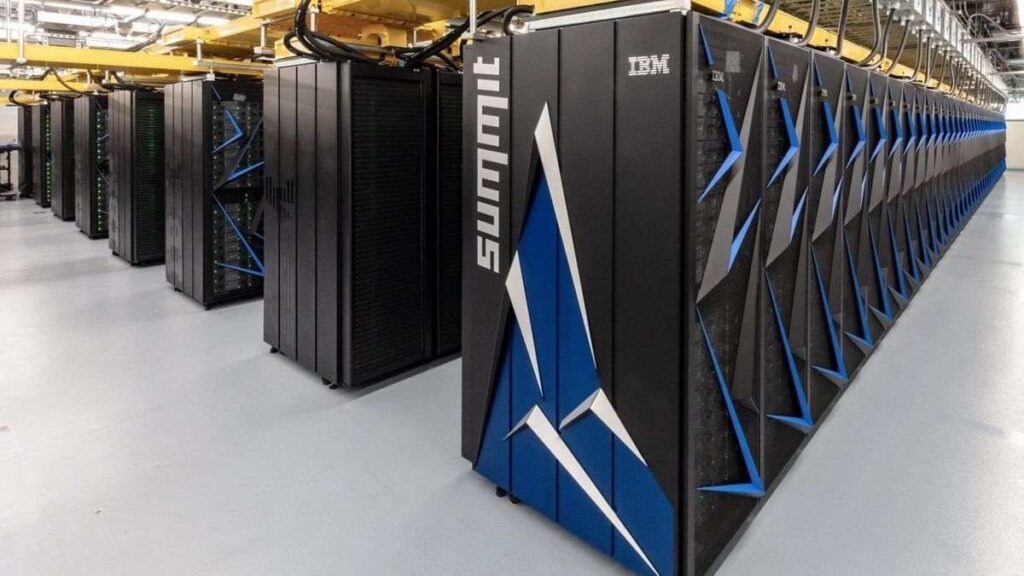
Supercomputers are the biggest and fastest computers. They are designed to process huge amount of data. A supercomputer can process trillions of instructions in a second. It has thousands of interconnected processors.
Supercomputers are particularly used in scientific and engineering applications such as weather forecasting, scientific simulations and nuclear energy research. The first supercomputer was developed by Roger Cray in 1976
Characteristics or applications of supercomputers:
It has the ability to decrypt your password to enhance protection for security reasons.
It produces excellent results in animations.
It is used for virtual testing of nuclear weapons and critical medical tests.
It can study and understand climate patterns and forecast weather conditions. It can run in NOAA’s system (National Oceanic and Atmospheric Administration) that can execute any type of simple and logical data.
It helps in designing the flight simulators for pilots at the beginner level for their training.
It helps in extracting useful information from data storage centres or cloud system. For example, in insurance companies.
It has played a vital role in managing the online currency world such as stock market and bitcoin.
Supercomputer या जिसे महासंगणक भी कहा जाता है Supercomputer बहुत ही Advance कंप्यूटर होते हैं जिनका इस्तेमाल विशेष प्रकार के कार्यों में किया जाता है. ये कंप्यूटर बहुत फ़ास्ट होते हैं और तेजी के साथ जटिल समीकरणों को हल करने में सक्षम होते हैं. ये दुनिया के सबसे शक्तिशाली कंप्यूटर होते हैं. सुपर कंप्यूटर की स्पीड को FLOPS (Floating Point Operation Per Second) में मापा जाता है.
सुपर कंप्यूटर आकार में बहुत बड़े होते हैं और ये सामान्य उद्देश्यों कामों के लिए इस्तेमाल नहीं होते हैं. ये पूरी अलग तरह से काम करते हैं. इनकी कार्यक्षमता मानव की सीमाओं से भी बहुत आगे होती है. जिन जटिल समीकरणों को एक मानव हल नहीं कर सकता है उसे ये कंप्यूटर कुछ ही सेकंड में हल कर देते हैं.
सुपर कंप्यूटर पर कई लोग मिलकर एक साथ काम करते हैं. ऐसे कंप्यूटरों का उपयोग मुख्य रूप से वैज्ञानिक और इंजीनियरिंग कार्यों के लिए किया जाता है जिनमें अत्यधिक उच्च गति की गणना की आवश्यकता होती है. दुनिया का पहला Supercomputer 1960 में बनकर तैयार हुआ था जिसका नाम CDC 1604 था.
मुख्य बिंदु
विवरण
कंप्यूटर का नाम
सुपर कंप्यूटर
दुनिया के सुपर कंप्यूटर
Fugaku, Sunway TaihuLight, Summit, Sierra इत्यादि.
भारत के सुपर कंप्यूटर
PARAM Siddhi-AI, Pratyush, Mihir इत्यादि.
सुपर कंप्यूटर की कीमत
करोड़ और अरबों रुपए (लगभग)
भारत का पहला सुपर कंप्यूटर
PARAM 8000
दुनिया का पहला सुपर कंप्यूटर
इल्लीआक 4
विश्व का सबसे तेज सुपर कंप्यूटर
Fugaku Super Computer
2) Mainframe computer
mainframe computer
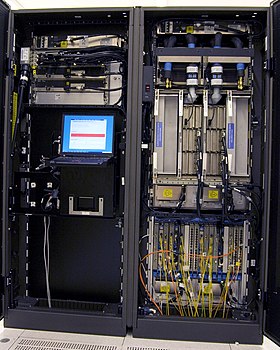
Mainframe computers are designed to support hundreds or thousands of users simultaneously. They can support multiple programs at the same time. It means they can execute different processes simultaneously. These features of mainframe computers make them ideal for big organizations like banking and telecom sectors, which need to manage and process high volume of data.
Mainframe computers are designed to support hundreds or thousands of users simultaneously. They can support multiple programs at the same time. It means they can execute different processes simultaneously. These features of mainframe computers make them ideal for big organizations like banking and telecom sectors, which need to manage and process a high volume of data that requires integer operations such as indexing, comparisons, etc.
Characteristics of Mainframe Computers:
It can process huge amount of data, e.g. millions of transactions in a second in the banking sector.
It has a very long life. It can run smoothly for up to 50 years after proper installation.
It gives excellent performance with large scale memory management.
It has the ability to share or distribute its workload among other processors and input/output terminals.
Mainframe Computer एक बड़ी आकार वाले मशीन होते हैं जिसमे उच्च मेमोरी, विशाल स्टोरेज और बहुत उच्च ग्रेड के प्रोसेसर होते हैं. सामान्य डिजिटलकंप्यूटर की तुलना में मेनफ़्रेम कंप्यूटर बहुत तेज और शक्तिशाली होते हैं.
यह काफी तेजी से डेटा को प्रोसेस करते हैं इसलिए इनका उपयोग बैंकिंग, सरकारी विभाग, बड़ी कंपनियों, वैज्ञानिक अनुसंधान और जनगणना डेटा आदि में एक Centralized Machine के रूप में किया जाता है. मेनफ़्रेम कंप्यूटर Ultra Speed पर एक साथ कई कार्यों को करने में सक्षम हैं, इन कंप्यूटर में एक साथ सैकड़ों यूजर काम कर सकते हैं.
मेनफ़्रेम कंप्यूटर आकार में बहुत बड़े होते हैं. एक सामान्य मेनफ़्रेम कंप्यूटर 2000 Square Feet से लेकर 10000 Square Feet तक के एरिया को कवर कर सकते हैं. इनकी स्टोरेज क्षमता भी बहुत अधिक होती हैं. माइक्रो कंप्यूटर और मिनी कंप्यूटर की तुलना में मेनफ़्रेम कंप्यूटर बहुत महंगे होते हैं. इस लिए इन्हें मेनफ़्रेम कंप्यूटर कहते है.
आज के समय में मेनफ़्रेम कंप्यूटर के अनेक उदाहरण मौजूद हैं, हमने नीचे आपको कुछ लोकप्रिय मेनफ़्रेम कंप्यूटर उदाहरणों के बारे में बताया है.
IBM Z Series – IBM Z15, IBM Z14, IBM System Z13, IBM System Z10, IBM System Z9 Etc.
Tianhe-1A; NUDT YH Cluster
Jaguar; Cray XT5
Nebulae; Dawning TC3600 Blad
IBM 370, S/390
Fujitsu’s ICL VME
Hitachi’s Z800
I Series System
3) Miniframe or Minicomputer
Miniframe or Minicomputer
It is a midsize multiprocessing computer. It consists of two or more processors and can support 4 to 200 users at one time. Miniframe computers are used in institutes and departments for tasks such as billing, accounting and inventory management. A minicomputer lies between the mainframe and microcomputer as it is smaller than mainframe but larger than a microcomputer.
Characteristics of miniframe or minicomputer:
It is light weight that makes it easy to carry and fit anywhere.
It is less expensive than mainframe computers.
It is very fast compared to its size.
It remains charged for a long time.
It does not require a controlled operational environment.
यह माइक्रो कंप्यूटर की तुलना में ज़्यादा शक्तिशाली होते हैं, यह माइक्रो कंप्यूटर से बड़ा और मेनफ्रेम कंप्यूटर से छोटा होता हैं, इसका प्रयोग ट्रैफिक कंट्रोल, बैंकों में तथा बड़ी-बड़ी कंपनियों में किया जाता हैं। इस कंप्यूटर पर एक साथ कई व्यक्ति काम कर सकते हैं। इसकी संग्रहण क्षमता भी अधिक होती है।
यह एक मल्टी-प्रोसेसिंग और मल्टी-यूजर कंप्यूटर है। इस पर एक ही समय में कई प्रोग्राम, कई यूजर रन कर सकते हैं। इसे मध्य श्रेणी सर्वर (Server) के रूप में भी जाना जाता है, यह व्यापार, प्राइवेट सेक्टरो, वित्तीय डेटा और अनुप्रयोगों के लिए उपयोग किया जाता है। इस कंप्यूटर की संग्रहण क्षमता और गति मिनी कंप्यूटर से भी अधिक होती है।
4) Workstation
workstation
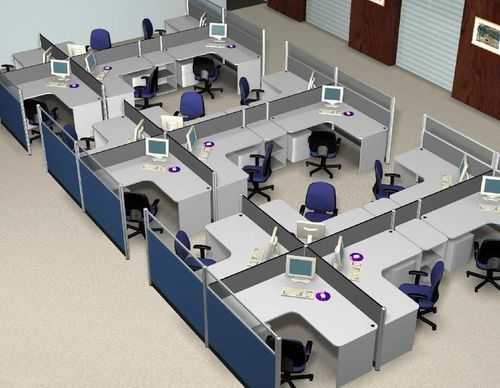
Workstation is a single user computer that is designed for technical or scientific applications. It has a faster microprocessor, a large amount of RAM and high speed graphic adapters. It generally performs a specific job with great expertise; accordingly, they are of different types such as graphics workstation, music workstation and engineering design workstation.
Characteristics of workstation computer:
It is a high-performance computer system designed for a single user for business or professional use.
It has larger storage capacity, better graphics, and more powerful CPU than a personal computer.
It can handle animation, data analysis, CAD, audio and video creation and editing.
वर्कस्टेशन कंप्यूटर एक विशेष प्रकार का कंप्यूटर होता है जिसमें नॉर्मल कंप्यूटर की तुलना में अधिक प्रोसेसिंग पावर होती है। आप वर्कस्टेशन में एक नॉर्मल कंप्यूटर से ज्यादा काम कर सकते हैं।
एक नॉर्मल कंप्यूटर, इंटरनेट ब्राउज़िंग, वर्ड प्रोसेसिंग, और गाना सुनने आदि जैसे नॉर्मल काम करता है लेकिन एक वर्कस्टेशन वीडियो एडिटिंग, हाई ग्राफिक्स गेम खेलना, 3D Animation और कॉम्प्लेक्स सिमुलेशन जैसे हाई लेवल के काम कर सकता है।
5) Microcomputer
micro computer
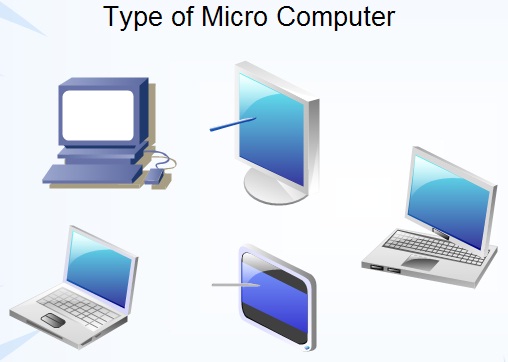
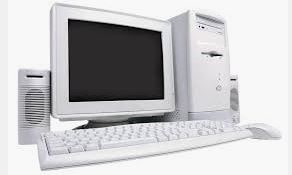
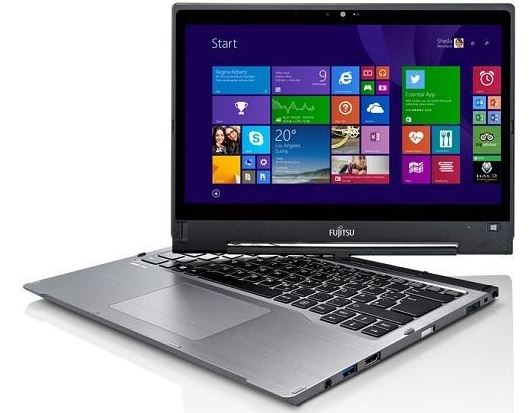
Microcomputer is also known as a personal computer. It is a general-purpose computer that is designed for individual use. It has a microprocessor as a central processing unit, memory, storage area, input unit and output unit. Laptops and desktop computers are examples of microcomputers. They are suitable for personal work that may be making an assignment, watching a movie, or at office for office work.
Characteristics of a microcomputer:
It is the smallest in size among all types of computers.
A limited number of software can be used.
It is designed for personal work and applications. Only one user can work at a time.
It is less expansive and easy to use.
It does not require the user to have special skills or training to use it.
Generally, comes with single semiconductor chip.
माइक्रो कंप्यूटर एक छोटे आकार के कंप्यूटर होते हैं जिनमें CPU के स्थान पर माइक्रो प्रोसेसर का इस्तेमाल किया जाता है. माइक्रो कंप्यूटर को एक व्यक्ति के उपयोग करने के लिए डिजाईन किया गया है. माइक्रो कंप्यूटर एक पुराना शब्द है अब इस शब्द के स्थान पर पर्सनल कंप्यूटर का इस्तेमाल किया जाता है. माइक्रो कंप्यूटर को एक समय में एक ही व्यक्ति इस्तेमाल कर सकता है.
माइक्रो कंप्यूटर में माइक्रो प्रोसेसर, RAM, ROM, इनपुट और आउटपुट पोर्ट Interconnecting वायर सभी एक यूनिट में रखे जाते हैं जिसे कि मदरबोर्ड कहते हैं. माइक्रो कंप्यूटर का इस्तेमाल सामान्य उद्देश्य कार्यों को करने के लिए घरों, स्कूल, कॉलेज, ऑफिस आदि स्थानों में किया जाता
First Generation of Computer – कंप्यूटर की पहली पीढ़ी
The first generation
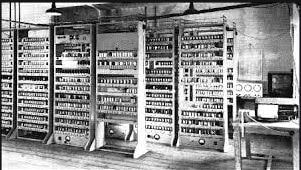
The first generation (1946-1959) computers were slow, huge and expensive. In these computers, vacuum tubes were used as the basic components of CPU and memory. These computers were mainly depended on batch operating system and punch cards. Magnetic tape and paper tape were used as output and input devices in this generation;
Some of the popular first generation computers are;
अवधि 1946-1959 तक मानी जाती है। दो महान साइंटिस्ट द्वारा दुनिया का पहला और सबसे बड़ा ENIAC (Electronic Numerical Integrator and Computer) कंप्यूटर का निर्माण किया गया था। यह एक Fully Electronic Digital Computer था। Generation of Computer की शुरुआत यहीं से हुई थी।
लेकिन इस पीढ़ी के कम्पूटरो में मेमोरी के लिए Vacuum tube का इस्तमाल किया जाता था। Vacuum Tube के कारण यह कंप्यूटर आकर में बड़े, सिमित मेमोरी वाले और अधिक बिजली का खर्च करते थे। इन कम्पूटरो में बड़ी मात्रा में गर्मी उत्पन्न होती थी।
पहली पीढ़ी के कंप्यूटर की विशेषताएँ
Vacuum tube द्वारा निर्मित
मशीनी भाषा का प्रयोग
अधिक महंगा
आकार में बहुत बड़ा
अधिक वजिनी और धीमी गति
AC की आवश्यकता
अधिक मात्रा में बिजली का उपयोग
इनपुट और आउटपुट के लिए पंच कार्ड और चुम्बकीये टेप का प्रयोग
पहली पीढ़ी के कम्प्यूटरो के नाम
ENIAC
EDVAC
EDSAC
UNIVAC
MARK-1
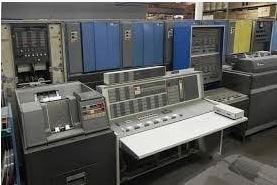
Second Generation Computers The years 1957-1963 were referred to as the “second generation of computers” at the time. In second-generation computers, COBOL and FORTRAN are employed as assembly languages and programming languages. Here they advanced from vacuum tubes to transistors. This made the computers smaller, faster and more energy-efficient. And they advanced from binary to assembly languages. For instance, IBM 1620, IBM 7094, CDC 1604, CDC 3600, and so forth.
second generation
Second Generation of Computer – कंप्यूटर की दूसरी पीढ़ी
दूसरी पीढ़ी की अवधि 1957-1963 तक मानी जाती है। इस पीढ़ी में Vacuum tube को रिप्लेस करके transistor का प्रयोग किया गया। Transistor का विकास Willom Shockly ने 1947 में किया था।
इस पीढ़ी के कम्पूटरो में चुम्बकीये कोर का उपयोग प्राइमरी मेमोरी और चुम्बकीये टेप और चुम्बकीये डिस्क का उपयोग सेकेंडरी मेमोरी के लिए किया गया था।
कंप्यूटर की दूसरी पीढ़ी में दो प्रकार के ऑपरेटिंग सिस्टम का उपयोग किया जाता था। पहला Batch processing और दूसरा Multiprogramming ऑपरेटिंग सिस्टम।
दूसरी पीढ़ी के कंप्यूटर की विशेषताएँ
Transistor द्वारा निर्मित
पहली पीढ़ी की तुलना में ज्यादा विश्वसनीय थे
इसमें Assembly और High level language जैसे Fortran , Cobol का उपयोग किया जाता था
पहली पीढ़ी की तुलना में आकार में छोटा
इनमें कम गर्मी उत्पन्न होती थी
पहली पीढ़ी की तुलना में कम बिजली खर्च होती थी
पहले के कम्प्यूटरो से तेज
AC की आवश्यकता
दूसरी पीढ़ी के कम्प्यूटरो के नाम
IBM 1620
IBM 7094
CDC 1604
CDC 3600
UNIVAC 1108
Third Generation Computers The third generation computers used integrated circuits (ICs) instead of transistors. A single IC can pack huge number of transistors which increased the power of a computer and reduced the cost. The computers also became more reliable, efficient and smaller in size. These generation computers used remote processing, time-sharing, multi programming as operating system. Also, the high-level programming languages like FORTRON-II TO IV, COBOL, PASCAL PL/1, ALGOL-68 were used in this generation.
Some of the popular third generation computers are;
IBM-360 series Honeywell-6000 series PDP(Personal Data Processor) IBM-370/168 TDC-316
third generation
तीसरी पीढ़ी की अवधि 1963-1972 तक मानी जाती थी। इस पीढ़ी में Transistor को रिप्लेस करके IC यानि Integrated Circuit का इस्तमाल किया गया था। इसमें transistor को छोटा करके Silicon chip पर रखा गया।
जिसके कारण कंप्यूटर की गति और दक्षता में काफी वृद्धि हुई। Integrated Circuit का अविष्कार Jack Kilby ने किया था। इस पीढ़ी के कम्पूटरो में रिमोट प्रोसेसिंग, टाइम शेयरिंग और मल्टीप्रोग्रम्मिंग ऑपरेटिंग सिस्टम का उपयोग किया गया था।
तीसरी पीढ़ी के कंप्यूटर की विशेषताएँ
Integrated Circuit का उपयोग
पहली और दूसरी पीढ़ी की तुलना में ज्यादा विश्वसनीय
आकार में छोटा और तेज लेकिन रखरखाव में अभी भी कठिन
अन्य पीढ़ी की तुलना में कम ऊर्चा की खपत
AC की आवश्यकता
Mouse और Keyboard का उपयोग
High level language जैसे-FORTRAN-I to IV, COBOL, PASCAL, BASIC, ALGOL का उपयोग
तीसरी पीढ़ी के कम्प्यूटरो के नाम
IBM-360 Series
Honeywell – 6000 series
PDP (Personal Data Processor)
IBM-370/168
TDC-316
4th Generation:
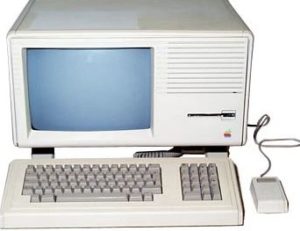
The invention of the microprocessors brought along the fourth generation of computers. The years 1971-1980 were dominated by fourth generation computers. C, C++ and Java were the programming languages utilized in this generation of computers. For instance, the STAR 1000, PDP 11, CRAY-1, CRAY-X-MP, and Apple II. This was when we started producing computers for home use.
fourth generation of computer
Fourth Generation of Computer – कंप्यूटर की चौथी पीढ़ी चौथी पीढ़ी की अवधि 1972-1984 तक मानी गई है। इस पीढ़ी के कम्पूटरो में VLSI (Very Large Scale Integrated) circuit का उपयोग किया गया। इस VLSI circuit के एक Silicon chip पर लगभग 5000 transistor और अन्य circuit तत्व होते है। जिसे Micro Processor कहा जाता है।
पहला Micro Processor 1971 में Intel द्वारा पहली बार पेश किया गया था। जिसका अविष्कार उनके employee ने किया था। उन्होंने इसे Intel 4004 का नाम दिया था।
जबकि 1981 में IBM ने Micro Computer का विकास किया, जिसे Personal Computer (PC) कहा जाता है, और एप्पल ने 1989 में Macintosh (Personal Computer) पेश किया था।
यह कंप्यूटर जीवन के हर क्षेत्र में बहुत तेजी से उपयोग किये जाने लगे थे। क्योंकि यह अन्य पीढ़ी के कम्पूटरो की तुलना में सस्ते, तेज और ज्यादा विश्वसनीय थे।
चौथी पीढ़ी के कम्प्यूटरो में internet, GUI (Graphical User Interface) और operating system (जैसे-MS Dos, MS Window और Apple OS) का विकास हुआ था।
चौथी पीढ़ी के कंप्यूटर की विशेषताएँ
Very Large Scale Integrated Circuit का उपयोग
कम खर्च और अधिक तेज
आकार में छोटे और कम वाजनीये
विधुत का बहुत कम प्रयोग
AC की जरुरत नहीं
रखरखाव सरल
Operate करना एवं चलना सरल
High level language जैसे– C, C++, DBASE का उपयोग
चौथी पीढ़ी के कम्प्यूटरो के नाम
Dec 10
Star 1000
PDP 11
CRAY-1
CRAY-X-MP (Super Computer)
PCs
Fifth Generation Computers In fifth generation (1980-till date) computers, the VLSI technology was replaced with ULSI (Ultra Large Scale Integration). It made possible the production of microprocessor chips with ten million electronic components. This generation computers used parallel processing hardware and AI (Artificial Intelligence) software. The programming languages used in this generation were C, C++, Java, .Net, etc.
Some of the popular fifth generation computers are;
Desktop Laptop NoteBook UltraBook ChromeBoo
fifth generation
Fifth Generation of computer – कंप्यूटर की पांचवी पीढ़ी पांचवी पीढ़ी की अवधि 1984-1990 तक मानी गई है। इस पीढ़ी में वर्तमान के कम्प्यूटरो को और भविष्य में आने वाले कम्प्यूटरो को शामिल किया गया है। इस पीढ़ी के कंप्यूटर अधिक शक्तिशाली, तेज, उच्च तकनीक और ज्यादा मेमोरी वाले कंप्यूटर है।
इसमें ULSI (Ultra Large Scale Integrated) सर्किट का इस्तमाल किया गया, इस ULSI Microprocessor में लगभग एक करोड़ components आ सकते है। यह पीढ़ी मुख्य रूप से समानांतर प्रसंस्करण (Parallel processing) Hardware कृत्रिम बुद्धिमत्ता (Artificial Intelligence) software से सम्बंधित है।
पांचवी पीढ़ी का लक्ष्य ऐसे उपकरणों को विकसित करना है। जो सामान्य भाषा में उपयोग किए जाने वाले लोगो को जवाब दे सकते है। इससे कम्प्यूटर इंसानों की तरह काम करते है। वे C , C++ , और Java जैसी High level language का उपयोग करते है।
पांचवी पीढ़ी के कंप्यूटर की विशेषताएँ
ULSI टेक्नोलॉजी का उपयोग
Artificial Intelligence का विकास
Portable PC और Desktop PC का प्रयोग
Internet, E-mail और WWW (World Wide Web) का विकास हुआ
उपभोक्ता – अनुकूल (User friendly) interface और का विकास हुआ
मल्टीमीडिया फीचर्स जैसे-ध्वनि , ग्राफिक्स, चित्र और टेक्स्ट आदि का निर्माण हुआ
C, C++, Java, .net और ASP जैसी हाई लेवल भाषा का प्रयोग
अधिक तेज, विश्वसनीय और सस्ते
पांचवी पीढ़ी के कम्प्यूटरो के नाम
Desktop
Laptop
Notebook
Ultra book
Chrome boo
Sixth Generation of computer – कंप्यूटर की छठी पीढ़ी
छठी पीढ़ी बुद्धिमान कंप्यूटर के युग के रूप में परिभाषित है। इस पीढ़ी की शुरुवात 1990 से अब तक मानी गई है। जोकि Artificial neural network यानि कृत्रिम तंत्रिका नेटवर्क या Artificial Intelligence यानि कृत्रिम बुद्धिमत्ता पर आधारित है।
यह कंप्यूटर Processor के लिए superconductor का उपयोग करते है। जोकि बिजली बर्बाद नहीं करते और ऊर्जा की बचत करते है। इस पीढ़ी के कम्प्यूटर आकार में अधिक छोटे, तेज और शक्ति शाली है।
छठी पीढ़ी के कंप्यूटर में Intel Pentium और Intel Celeron नाम के processor का इस्तमाल किया गया है। लेकिन यह processor अब Dual core, triple core, Quad core के रूप में आने लगे है। ये processor दो CPU (Dual core) ,तीन CPU (triple core) और चार CPU(Quad core) चालाने के बराबर है।
sixth generation
इस पीढ़ी ने भी आवाज को पहचान दी क्योंकि इस पीढ़ी के कम्पूटरो में विभिन्न प्रकार के Advance Algorithm के माध्यम से सिखने की क्षमता है। इस बेहतर तकनीक से कंप्यूटर को input लेने और शब्दों को पहचने में अनुमति मिलती है।
लेकिन जब qubit या quantum bits की गणना की प्रक्रिया करते है। तो यह कंप्यूटर अन्य पीढ़ी के कम्पूटरो की तुलना में तेज और ज्यादा विश्सनीय होते है।
यह तकनीक कंप्यूटर के processor और मेमोरी के साथ मिलकर काम करती है।
छठी पीढ़ी की इस तकनीक से अंग्रेजी, चीनी, फ्रैंच और स्पेनिश जैसी जटिल भाषाओं को आसानी से process किया जाता है और इस तकनीक के साथ आप कंप्यूटर भाषाओं को भी आसानी से समझ सकते है।
जबकि Voice recognition छात्रों और विकलांगों के लिए वरदान है। Physical device को छुए बिना बोलकर भी कार्य कर सकते है। इसका उपयोग प्रयोगशाला के साफ कमरे, Surgical operating room और Customer service के लिए किया जाता है।
छठी पीढ़ी के कंप्यूटर की विशेषताएँ
Multiple Processor का प्रयोग
Parallel Vector Technology का उपयोग
Nano Technology
Quantum computing bits
UlSI तकनीक के उपयोग से एक चिप में लाखों components होते है
आकार में बहुत छोटे
कम वाजनिये और अधिक तेज
छठी पीढ़ी के कम्प्यूटरो के नाम
Optical computers– Optical कम्प्यूटरो में photons यानि प्रकाश किरणों का उपयोग किया गया। जिसकी गति बहुत अधिक है। Donald Fraxier द्वारा किए गए नीले लेसर खोज में पाया गया की यह तकनीक काम लागत में super fast, light weight और minicomputer विकास करती है।
Hologram Computer– Hologram एक three dimensional चित्र है। जो प्रकाश की तीव्रता की recording से बने होते है। इस प्रकार यह एक उपयुक्त illuminate यानि प्रकाश स्थिरता बनाते है। इसका आकार एक पेन, घडी या कुछ भी हो सकता है।
Parallel Vector computer– Fijistu Corporation 200 से ज्यादा vector processor के साथ एक system बनाने की योजना बना रहा है। हालांकि इस छठी पीढ़ी का एक और लक्ष्य है। Tera flops यानि प्रति second दस arithmetic operation को प्राप्त करना और यह एक हजार से अधिक processor वाली योजना का निर्माण करके किया जा सकता है। Fujistu का एक और प्रमुख विकास WAN है।
Seventh Generation of Computer – कंप्यूटर की सातवीं पीढ़ी
सातवीं पीढ़ी का मतलब है की, एक नई Processor का release होना।
आमतौर पर साल में 1 -3 बार Processor release होते है। इस प्रकार के विकास को Tick-Tock कहा जाता है। Tick का मतलब नई वास्तुकला और Tock का मतलब सुधार।
इस पीढ़ी के Desktop Computer 7th generation “Intel core Processor” पर आधारित है। यह computers smart , stylish design और आकार की एक सीमा के अनुसार बजट और जरूरतों के हिसाब से फिट है।
7th Generation
सातवीं पीढ़ी के कंप्यूटर की विशेषताएँ
इसमें पूर्ण आकार की screen पर 4K video और 360 viewing होती है।
इस पीढ़ी के कम्प्यूटरो में आज के modern games smoothly खेल सकते है।
शानदार स्पष्टता और Luminance 1 के लिए Ultra HD Blue ray के साथ 4K HDR फिल्मे देख सकते है।
Quick sync video technology अधिकांश वीडियो की क्षमताओं को तेज करती है।
Hyper Threading Technology की मदद से बिना किसी रूकावट के multitask कर सकते है।
AES (Advance Encryption Standard) की मदद से user data को Email, Internet एवं लोकल डिस्क पर भी एक मजबूत सुरक्षा मिलती है।
Intelligent Software के साथ system को तेज कार्य करने एवं commands का जल्दी पूरा करने में सहायता मिलती है।
history of computer

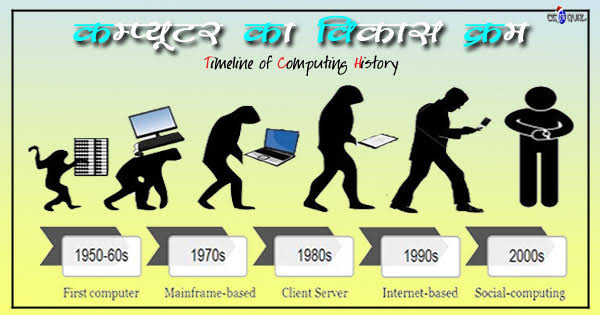
As human mind and technology improved with time more computing devices were developed. Some of the popular computing devices starting with the first to recent ones are described below;

1.Abacus

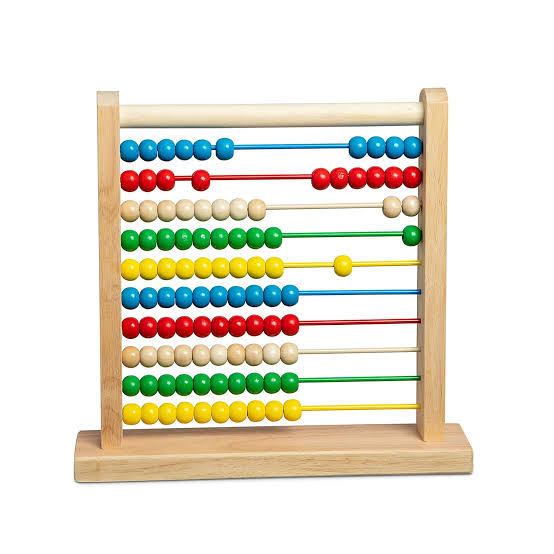
Abacus was invented by the Chinese around 4000 years ago. It’s a wooden rack with metal rods with beads attached to them. The abacus operator moves the beads according to certain guidelines to complete arithmetic computations.

2.Napier's Bones

It was a manually-operated calculating device which was invented by John Napier (1550-1617) of Merchiston. In this calculating tool, he used 9 different ivory strips or bones marked with numbers to multiply and divide. So, the tool became known as "Napier's Bones. It was also the first machine to use the decimal point.

3.Pascaline

Pascaline was invented in 1642 by Biaise Pascal, a French mathematician and philosopher. It is thought to be the first mechanical and automated calculator. It was a wooden box with gears and wheels inside.

4.Stepped Reckoner or Leibnitz wheel

It was developed by a German mathematician-philosopher Gottfried Wilhelm Leibnitz in 1673. He improved Pascal's invention to develop this machine. It was a digital mechanical calculator which was called the stepped reckoner as instead of gears it was made of fluted drums.

5.Difference Engine

In the early 1820s, Charles Babbage created the Difference Engine. It was a mechanical computer that could do basic computations. It was a steam-powered calculating machine used to solve numerical tables such as logarithmic tables.

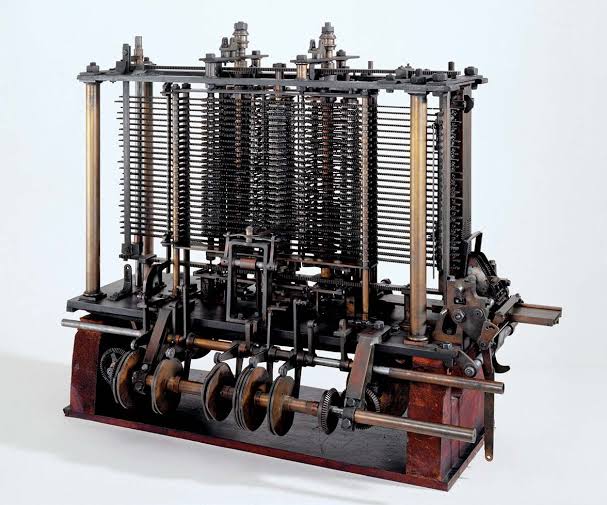
6.Analytical Engine

This calculating machine was also developed by Charles Babbage in 1830. It was a mechanical computer that used punch-cards as input. It was capable of solving any mathematical problem and storing information as a permanent memory.

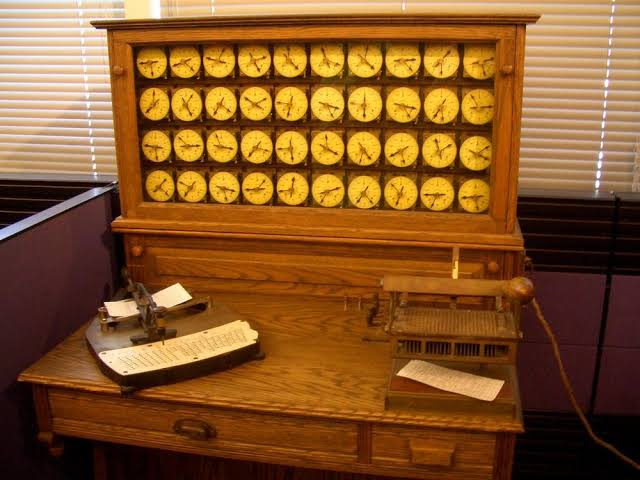
7.Tabulating Machine

An American Statistician – Herman Hollerith invented this machine in the year 1890. Tabulating Machine was a punch card-based mechanical tabulator. It could compute statistics and record or sort data or information. Hollerith began manufacturing these machines in his company, which ultimately became International Business Machines (IBM) in 1924.

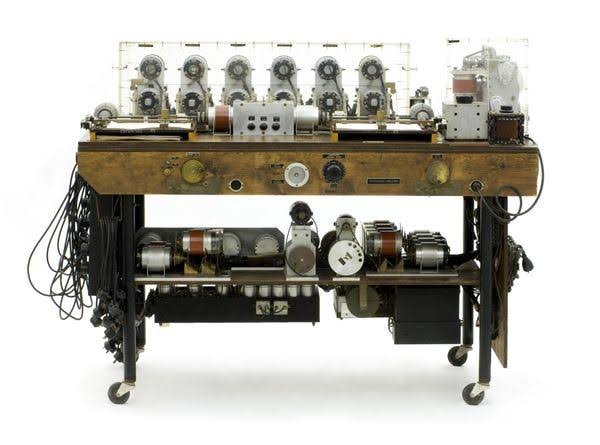
8.Differential Analyzer

It was the first electronic computer introduced in the United States in 1930. It was an analog device invented by Vannevar Bush. This machine has vacuum tubes to switch electrical signals to perform calculations. It could do 25 calculations in few minutes.

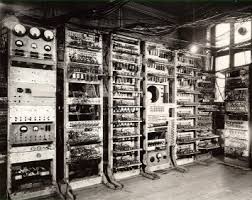
9.Mark I

Howard Aiken planned to build a machine in 1937 that could conduct massive calculations or calculations using enormous numbers. The Mark I computer was constructed in 1944 as a collaboration between IBM and Harvard

Early History of Computer

Since the evolution of humans, devices have been used for calculations for thousands of years. One of the earliest and most well-known devices was an abacus. Then in 1822, the father of computers, Charles Babbage began developing what would be the first mechanical computer. And then in 1833 he actually designed an Analytical Engine which was a general-purpose computer. It contained an ALU, some basic flow chart principles and the concept of integrated memory.

Then more than a century later in the history of computers, we got our first electronic computer for general purpose. It was the ENIAC, which stands for Electronic Numerical Integrator and Computer. The inventors of this computer were John W. Mauchly and J.Presper Eckert.

And with times the technology developed and the computers got smaller and the processing got faster. We got our first laptop in 1981 and it was introduced by Adam Osborne and EPSON.
Generations of Computers
In the history of computers, we often refer to the advancements of modern computers as the generation of computers. We are currently on the fifth generation of computers. So let us look at the important features of these five generations of computers.
The first generation (1946-1959) computers were slow, huge and expensive. In these computers, vacuum tubes were used as the basic components of CPU and memory. These computers were mainly depended on batch operating system and punch cards. Magnetic tape and paper tape were used as output and input devices in this generation;

Some of the popular first generation computers are;

ENIAC ( Electronic Numerical Integrator and Computer)
EDVAC ( Electronic Discrete Variable Automatic Computer)
UNIVACI( Universal Automatic Computer)
IBM-701
IBM-650
Second Generation Computers
The years 1957-1963 were referred to as the “second generation of computers” at the time. In second-generation computers, COBOL and FORTRAN are employed as assembly languages and programming languages. Here they advanced from vacuum tubes to transistors. This made the computers smaller, faster and more energy-efficient. And they advanced from binary to assembly languages.
For instance, IBM 1620, IBM 7094, CDC 1604, CDC 3600, and so forth.
Third Generation Computers
The third generation computers used integrated circuits (ICs) instead of transistors. A single IC can pack huge number of transistors which increased the power of a computer and reduced the cost. The computers also became more reliable, efficient and smaller in size. These generation computers used remote processing, time-sharing, multi programming as operating system. Also, the high-level programming languages like FORTRON-II TO IV, COBOL, PASCAL PL/1, ALGOL-68 were used in this generation.

Some of the popular third generation computers are;

IBM-360 series
Honeywell-6000 series
PDP(Personal Data Processor)
IBM-370/168
TDC-316
4th Generation: The invention of the microprocessors brought along the fourth generation of computers. The years 1971-1980 were dominated by fourth generation computers. C, C++ and Java were the programming languages utilized in this generation of computers. For instance, the STAR 1000, PDP 11, CRAY-1, CRAY-X-MP, and Apple II. This was when we started producing computers for home use.
ifth Generation Computers
In fifth generation (1980-till date) computers, the VLSI technology was replaced with ULSI (Ultra Large Scale Integration). It made possible the production of microprocessor chips with ten million electronic components. This generation computers used parallel processing hardware and AI (Artificial Intelligence) software. The programming languages used in this generation were C, C++, Java, .Net, etc.

Some of the popular fifth generation computers are;

Desktop
Laptop
NoteBook
UltraBook
ChromeBook
Brief History of Computers
19th Century
1801 – Joseph Marie Jacquard, a weaver and businessman from France, devised a loom that employed punched wooden cards to automatically weave cloth designs.

1822 – Charles Babbage, a mathematician, invented the steam-powered calculating machine capable of calculating number tables. The “Difference Engine” idea failed owing to a lack of technology at the time.

1848 – The world’s first computer program was written by Ada Lovelace, an English mathematician. Lovelace also includes a step-by-step tutorial on how to compute Bernoulli numbers using Babbage’s machine.

1890 – Herman Hollerith, an inventor, creates the punch card technique used to calculate the 1880 U.S. census. He would go on to start the corporation that would become IBM.

Early 20th Century
1930 – Differential Analyzer was the first large-scale automatic general-purpose mechanical analogue computer invented and built by Vannevar Bush.

1936 – Alan Turing had an idea for a universal machine, which he called the Turing machine, that could compute anything that could be computed.

1939 – Hewlett-Packard was discovered in a garage in Palo Alto, California by Bill Hewlett and David Packard.

1941 – Konrad Zuse, a German inventor and engineer, completed his Z3 machine, the world’s first digital computer. However, the machine was destroyed during a World War II bombing strike on Berlin.

1941 – J.V. Atanasoff and graduate student Clifford Berry devise a computer capable of solving 29 equations at the same time. The first time a computer can store data in its primary memory.

1945 – University of Pennsylvania academics John Mauchly and J. Presper Eckert create an Electronic Numerical Integrator and Calculator (ENIAC). It was Turing-complete and capable of solving “a vast class of numerical problems” by reprogramming, earning it the title of “Grandfather of computers.”

1946 – The UNIVAC I (Universal Automatic Computer) was the first general-purpose electronic digital computer designed in the United States for corporate applications.

1949 – The Electronic Delay Storage Automatic Calculator (EDSAC), developed by a team at the University of Cambridge, is the “first practical stored-program computer.”

1950 – The Standards Eastern Automatic Computer (SEAC) was built in Washington, DC, and it was the first stored-program computer completed in the United States.

Late 20th Century
1953 – Grace Hopper, a computer scientist, creates the first computer language, which becomes known as COBOL, which stands for COmmon, Business-Oriented Language. It allowed a computer user to offer the computer instructions in English-like words rather than numbers.

1954 – John Backus and a team of IBM programmers created the FORTRAN programming language, an acronym for FORmula TRANslation. In addition, IBM developed the 650.

1958 – The integrated circuit, sometimes known as the computer chip, was created by Jack Kirby and Robert Noyce.

1962 – Atlas, the computer, makes its appearance. It was the fastest computer in the world at the time, and it pioneered the concept of “virtual memory.”

1964 – Douglas Engelbart proposes a modern computer prototype that combines a mouse and a graphical user interface (GUI).

1969 – Bell Labs developers, led by Ken Thompson and Dennis Ritchie, revealed UNIX, an operating system developed in the C programming language that addressed program compatibility difficulties.

1970 – The Intel 1103, the first Dynamic Access Memory (DRAM) chip, is unveiled by Intel.

1971 – The floppy disc was invented by Alan Shugart and a team of IBM engineers. In the same year, Xerox developed the first laser printer, which not only produced billions of dollars but also heralded the beginning of a new age in computer printing.

1973 – Robert Metcalfe, a member of Xerox’s research department, created Ethernet, which is used to connect many computers and other gear.

1974 – Personal computers were introduced into the market. The first were the Altair Scelbi & Mark-8, IBM 5100, and Radio Shack’s TRS-80.

1975 – Popular Electronics magazine touted the Altair 8800 as the world’s first minicomputer kit in January. Paul Allen and Bill Gates offer to build software in the BASIC language for the Altair.

1976 – Apple Computers is founded by Steve Jobs and Steve Wozniak, who expose the world to the Apple I, the first computer with a single-circuit board.

1977 – At the first West Coast Computer Faire, Jobs and Wozniak announce the Apple II. It has colour graphics and a cassette drive for storing music.

1978 – The first computerized spreadsheet program, VisiCalc, is introduced.

1979 – WordStar, a word processing tool from MicroPro International, is released.

1981 – IBM unveils the Acorn, their first personal computer, which has an Intel CPU, two floppy drives, and a colour display. The MS-DOS operating system from Microsoft is used by Acorn.

1983 – The CD-ROM, which could carry 550 megabytes of pre-recorded data, hit the market. This year also saw the release of the Gavilan SC, the first portable computer with a flip-form design and the first to be offered as a “laptop.”

1984 – Apple launched Macintosh during the Superbowl XVIII commercial. It was priced at $2,500

1985 – Microsoft introduces Windows, which enables multitasking via a graphical user interface. In addition, the programming language C++ has been released.

1990 – Tim Berners-Lee, an English programmer and scientist, creates HyperText Markup Language, widely known as HTML. He also coined the term “WorldWideWeb.” It includes the first browser, a server, HTML, and URLs.

1993 – The Pentium CPU improves the usage of graphics and music on personal computers.

1995 – Microsoft’s Windows 95 operating system was released. A $300 million promotional campaign was launched to get the news out. Sun Microsystems introduces Java 1.0, followed by Netscape Communications’ JavaScript.

1996 – At Stanford University, Sergey Brin and Larry Page created the Google search engine.

1998 – Apple introduces the iMac, an all-in-one Macintosh desktop computer. These PCs cost $1,300 and came with a 4GB hard drive, 32MB RAM, a CD-ROM, and a 15-inch monitor.

1999 – Wi-Fi, an abbreviation for “wireless fidelity,” is created, originally covering a range of up to 300 feet.

21st Century
2000 – The USB flash drive is first introduced in 2000. They were speedier and had more storage space than other storage media options when used for data storage.

2001 – Apple releases Mac OS X, later renamed OS X and eventually simply macOS, as the successor to its conventional Mac Operating System.

2003 – Customers could purchase AMD’s Athlon 64, the first 64-bit CPU for consumer computers.

2004 – Facebook began as a social networking website.

2005 – Google acquires Android, a mobile phone OS based on Linux.

2006 – Apple’s MacBook Pro was available. The Pro was the company’s first dual-core, Intel-based mobile computer.

Amazon Web Services, including Amazon Elastic Cloud 2 (EC2) and Amazon Simple Storage Service, were also launched (S3)

2007 – The first iPhone was produced by Apple, bringing many computer operations into the palm of our hands. Amazon also released the Kindle, one of the first electronic reading systems, in 2007.

2009 – Microsoft released Windows 7.

2011 – Google introduces the Chromebook, which runs Google Chrome OS.

2014 – The University of Michigan Micro Mote (M3), the world’s smallest computer, was constructed.

2015 – Apple introduces the Apple Watch. Windows 10 was also released by Microsoft.

2016 – The world’s first reprogrammable quantum computer is built.
Through a computer, you can connect with your family and friends living miles away, store information, book railway tickets, access your bank accounts, play games, listen to music and watch movies!
•Example
File Create, Folder create, Search , Save , Print., calculate, etc.
हम कंप्यूटर से क्या कर सकते हैं?
एक कंप्यूटर के माध्यम से, आप मीलों दूर रहने वाले अपने परिवार और दोस्तों से जुड़ सकते हैं, जानकारी स्टोर कर सकते हैं, रेलवे टिकट बुक कर सकते हैं, अपने बैंक खाते एक्सेस कर सकते हैं, गेम खेल सकते हैं, संगीत सुन सकते हैं और फिल्में देख सकते हैं!
A computer is a programmable electronic device that accepts data as input and processes it with a set of instructions to produce the result as output. Example 2+2(data as input) (=) 4- output
संगणक क्या है?
संगणक एक प्रोग्रामेबल इलेक्ट्रॉनिक उपकरण है जो डेटा को इनपुट के रूप में स्वीकार करता है और आउटपुट के रूप में परिणाम देने के लिए निर्देशों के एक सेट के साथ इसे प्रोसेस करता है।
KYP:- The Bihar Skill Development Mission (BSDM) has launched a unique skill training programme by the name of “Kushal Yuva Program” which would enhance the employability Skills of all aspirants in the age group of 15-32 years who have passed at least 10th Class irrespective of their having attained higher education or their currently pursuing higher education. Soft Skills training would comprise of Life skills, Communications Skills (English & Hindi) and Basic computer literacy which in turn would enhance their employability and act as a value add to the various domain specific training endeavours currently being implemented in Bihar.
बिहार कौशल विकास मिशन (बीएसडीएम) ने एक अनूठा कौशल प्रशिक्षण शुरू किया है “कुशल युवा कार्यक्रम” के नाम से कार्यक्रम जो रोजगार में वृद्धि करेगा 15-32 वर्ष की आयु के सभी उम्मीदवारों का कौशल जिन्होंने कम से कम 10वीं पास की हो भले ही उन्होंने उच्च शिक्षा प्राप्त की हो या वे वर्तमान में उच्च शिक्षा प्राप्त कर रहे हों शिक्षा। सॉफ्ट स्किल्स प्रशिक्षण में जीवन कौशल, संचार कौशल (अंग्रेजी और हिंदी) और बुनियादी कंप्यूटर साक्षरता जो बदले में उनकी रोजगार क्षमता और कार्य को बढ़ाएगी वर्तमान में किए जा रहे विभिन्न डोमेन विशिष्ट प्रशिक्षण प्रयासों में मूल्यवर्धन के रूप में बिहार में लागू
BSDM:- Bihar Skill Development Mission (BSDM) has been constituted by The Labour Departmentof Bihar to empower the youth by providing them with requisite skills to fuel the growth of the State of Bihar.
बिहार सरकार के विकास को बढ़ावा देने के लिए आवश्यक कौशल प्रदान करके युवाओं को सशक्त बनाने के लिए बिहार सरकार के श्रम विभाग द्वारा बिहार कौशल विकास मिशन (बीएसडीएम) का गठन किया गया है।
MKCL:- Maharashtra Knowledge Corporation Limited(MKCL) is a public limited company promoted by the Department of Higher and Technical Education, Government of Maharashtra.
महाराष्ट्र नॉलेज कॉर्पोरेशन लिमिटेड (MKCL) महाराष्ट्र सरकार के उच्च और तकनीकी शिक्षा विभाग द्वारा प्रवर्तित एक सार्वजनिक लिमिटेड कंपनी है।
ERA:- It is a software. ( eLearning Revolution for All)
यह एक सॉफ्टवेयर है। (सभी के लिए ई-लर्निंग क्रांति)








 Abacus was invented by the Chinese around 4000 years ago. It’s a wooden rack with metal rods with beads attached to them. The abacus operator moves the beads according to certain guidelines to complete arithmetic computations.
2.Napier's Bones
Abacus was invented by the Chinese around 4000 years ago. It’s a wooden rack with metal rods with beads attached to them. The abacus operator moves the beads according to certain guidelines to complete arithmetic computations.
2.Napier's Bones
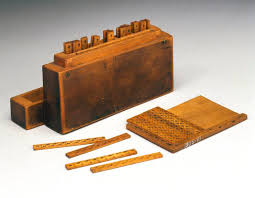 It was a manually-operated calculating device which was invented by John Napier (1550-1617) of Merchiston. In this calculating tool, he used 9 different ivory strips or bones marked with numbers to multiply and divide. So, the tool became known as "Napier's Bones. It was also the first machine to use the decimal point.
3.Pascaline
It was a manually-operated calculating device which was invented by John Napier (1550-1617) of Merchiston. In this calculating tool, he used 9 different ivory strips or bones marked with numbers to multiply and divide. So, the tool became known as "Napier's Bones. It was also the first machine to use the decimal point.
3.Pascaline
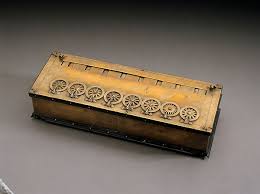 Pascaline was invented in 1642 by Biaise Pascal, a French mathematician and philosopher. It is thought to be the first mechanical and automated calculator. It was a wooden box with gears and wheels inside.
4.Stepped Reckoner or Leibnitz wheel
Pascaline was invented in 1642 by Biaise Pascal, a French mathematician and philosopher. It is thought to be the first mechanical and automated calculator. It was a wooden box with gears and wheels inside.
4.Stepped Reckoner or Leibnitz wheel
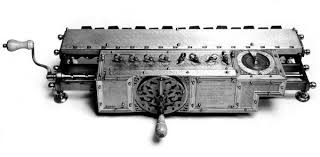 It was developed by a German mathematician-philosopher Gottfried Wilhelm Leibnitz in 1673. He improved Pascal's invention to develop this machine. It was a digital mechanical calculator which was called the stepped reckoner as instead of gears it was made of fluted drums.
5.Difference Engine
It was developed by a German mathematician-philosopher Gottfried Wilhelm Leibnitz in 1673. He improved Pascal's invention to develop this machine. It was a digital mechanical calculator which was called the stepped reckoner as instead of gears it was made of fluted drums.
5.Difference Engine
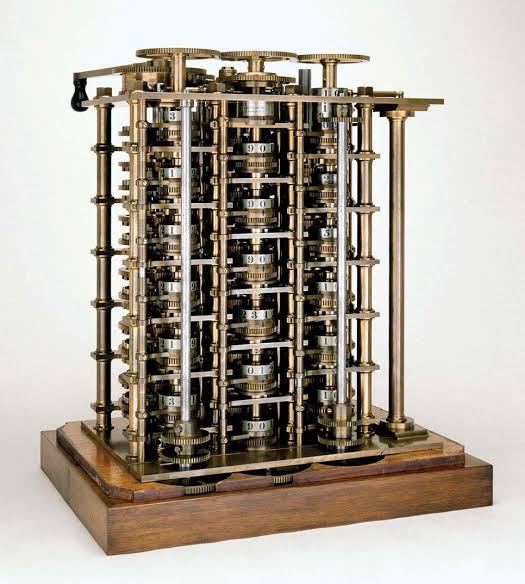 In the early 1820s, Charles Babbage created the Difference Engine. It was a mechanical computer that could do basic computations. It was a steam-powered calculating machine used to solve numerical tables such as logarithmic tables.
6.Analytical Engine
In the early 1820s, Charles Babbage created the Difference Engine. It was a mechanical computer that could do basic computations. It was a steam-powered calculating machine used to solve numerical tables such as logarithmic tables.
6.Analytical Engine
 This calculating machine was also developed by Charles Babbage in 1830. It was a mechanical computer that used punch-cards as input. It was capable of solving any mathematical problem and storing information as a permanent memory.
7.Tabulating Machine
This calculating machine was also developed by Charles Babbage in 1830. It was a mechanical computer that used punch-cards as input. It was capable of solving any mathematical problem and storing information as a permanent memory.
7.Tabulating Machine
 An American Statistician – Herman Hollerith invented this machine in the year 1890. Tabulating Machine was a punch card-based mechanical tabulator. It could compute statistics and record or sort data or information. Hollerith began manufacturing these machines in his company, which ultimately became International Business Machines (IBM) in 1924.
8.Differential Analyzer
An American Statistician – Herman Hollerith invented this machine in the year 1890. Tabulating Machine was a punch card-based mechanical tabulator. It could compute statistics and record or sort data or information. Hollerith began manufacturing these machines in his company, which ultimately became International Business Machines (IBM) in 1924.
8.Differential Analyzer
 It was the first electronic computer introduced in the United States in 1930. It was an analog device invented by Vannevar Bush. This machine has vacuum tubes to switch electrical signals to perform calculations. It could do 25 calculations in few minutes.
9.Mark I
It was the first electronic computer introduced in the United States in 1930. It was an analog device invented by Vannevar Bush. This machine has vacuum tubes to switch electrical signals to perform calculations. It could do 25 calculations in few minutes.
9.Mark I
 Howard Aiken planned to build a machine in 1937 that could conduct massive calculations or calculations using enormous numbers. The Mark I computer was constructed in 1944 as a collaboration between IBM and Harvard
Early History of Computer
Since the evolution of humans, devices have been used for calculations for thousands of years. One of the earliest and most well-known devices was an abacus. Then in 1822, the father of computers, Charles Babbage began developing what would be the first mechanical computer. And then in 1833 he actually designed an Analytical Engine which was a general-purpose computer. It contained an ALU, some basic flow chart principles and the concept of integrated memory.
Then more than a century later in the history of computers, we got our first electronic computer for general purpose. It was the ENIAC, which stands for Electronic Numerical Integrator and Computer. The inventors of this computer were John W. Mauchly and J.Presper Eckert.
And with times the technology developed and the computers got smaller and the processing got faster. We got our first laptop in 1981 and it was introduced by Adam Osborne and EPSON.
Generations of Computers
In the history of computers, we often refer to the advancements of modern computers as the generation of computers. We are currently on the fifth generation of computers. So let us look at the important features of these five generations of computers.
The first generation (1946-1959) computers were slow, huge and expensive. In these computers, vacuum tubes were used as the basic components of CPU and memory. These computers were mainly depended on batch operating system and punch cards. Magnetic tape and paper tape were used as output and input devices in this generation;
Some of the popular first generation computers are;
ENIAC ( Electronic Numerical Integrator and Computer)
EDVAC ( Electronic Discrete Variable Automatic Computer)
UNIVACI( Universal Automatic Computer)
IBM-701
IBM-650
Second Generation Computers
The years 1957-1963 were referred to as the “second generation of computers” at the time. In second-generation computers, COBOL and FORTRAN are employed as assembly languages and programming languages. Here they advanced from vacuum tubes to transistors. This made the computers smaller, faster and more energy-efficient. And they advanced from binary to assembly languages.
For instance, IBM 1620, IBM 7094, CDC 1604, CDC 3600, and so forth.
Third Generation Computers
The third generation computers used integrated circuits (ICs) instead of transistors. A single IC can pack huge number of transistors which increased the power of a computer and reduced the cost. The computers also became more reliable, efficient and smaller in size. These generation computers used remote processing, time-sharing, multi programming as operating system. Also, the high-level programming languages like FORTRON-II TO IV, COBOL, PASCAL PL/1, ALGOL-68 were used in this generation.
Some of the popular third generation computers are;
IBM-360 series
Honeywell-6000 series
PDP(Personal Data Processor)
IBM-370/168
TDC-316
4th Generation: The invention of the microprocessors brought along the fourth generation of computers. The years 1971-1980 were dominated by fourth generation computers. C, C++ and Java were the programming languages utilized in this generation of computers. For instance, the STAR 1000, PDP 11, CRAY-1, CRAY-X-MP, and Apple II. This was when we started producing computers for home use.
ifth Generation Computers
In fifth generation (1980-till date) computers, the VLSI technology was replaced with ULSI (Ultra Large Scale Integration). It made possible the production of microprocessor chips with ten million electronic components. This generation computers used parallel processing hardware and AI (Artificial Intelligence) software. The programming languages used in this generation were C, C++, Java, .Net, etc.
Some of the popular fifth generation computers are;
Desktop
Laptop
NoteBook
UltraBook
ChromeBook
Brief History of Computers
19th Century
1801 – Joseph Marie Jacquard, a weaver and businessman from France, devised a loom that employed punched wooden cards to automatically weave cloth designs.
1822 – Charles Babbage, a mathematician, invented the steam-powered calculating machine capable of calculating number tables. The “Difference Engine” idea failed owing to a lack of technology at the time.
1848 – The world’s first computer program was written by Ada Lovelace, an English mathematician. Lovelace also includes a step-by-step tutorial on how to compute Bernoulli numbers using Babbage’s machine.
1890 – Herman Hollerith, an inventor, creates the punch card technique used to calculate the 1880 U.S. census. He would go on to start the corporation that would become IBM.
Early 20th Century
1930 – Differential Analyzer was the first large-scale automatic general-purpose mechanical analogue computer invented and built by Vannevar Bush.
1936 – Alan Turing had an idea for a universal machine, which he called the Turing machine, that could compute anything that could be computed.
1939 – Hewlett-Packard was discovered in a garage in Palo Alto, California by Bill Hewlett and David Packard.
1941 – Konrad Zuse, a German inventor and engineer, completed his Z3 machine, the world’s first digital computer. However, the machine was destroyed during a World War II bombing strike on Berlin.
1941 – J.V. Atanasoff and graduate student Clifford Berry devise a computer capable of solving 29 equations at the same time. The first time a computer can store data in its primary memory.
1945 – University of Pennsylvania academics John Mauchly and J. Presper Eckert create an Electronic Numerical Integrator and Calculator (ENIAC). It was Turing-complete and capable of solving “a vast class of numerical problems” by reprogramming, earning it the title of “Grandfather of computers.”
1946 – The UNIVAC I (Universal Automatic Computer) was the first general-purpose electronic digital computer designed in the United States for corporate applications.
1949 – The Electronic Delay Storage Automatic Calculator (EDSAC), developed by a team at the University of Cambridge, is the “first practical stored-program computer.”
1950 – The Standards Eastern Automatic Computer (SEAC) was built in Washington, DC, and it was the first stored-program computer completed in the United States.
Late 20th Century
1953 – Grace Hopper, a computer scientist, creates the first computer language, which becomes known as COBOL, which stands for COmmon, Business-Oriented Language. It allowed a computer user to offer the computer instructions in English-like words rather than numbers.
1954 – John Backus and a team of IBM programmers created the FORTRAN programming language, an acronym for FORmula TRANslation. In addition, IBM developed the 650.
1958 – The integrated circuit, sometimes known as the computer chip, was created by Jack Kirby and Robert Noyce.
1962 – Atlas, the computer, makes its appearance. It was the fastest computer in the world at the time, and it pioneered the concept of “virtual memory.”
1964 – Douglas Engelbart proposes a modern computer prototype that combines a mouse and a graphical user interface (GUI).
1969 – Bell Labs developers, led by Ken Thompson and Dennis Ritchie, revealed UNIX, an operating system developed in the C programming language that addressed program compatibility difficulties.
1970 – The Intel 1103, the first Dynamic Access Memory (DRAM) chip, is unveiled by Intel.
1971 – The floppy disc was invented by Alan Shugart and a team of IBM engineers. In the same year, Xerox developed the first laser printer, which not only produced billions of dollars but also heralded the beginning of a new age in computer printing.
1973 – Robert Metcalfe, a member of Xerox’s research department, created Ethernet, which is used to connect many computers and other gear.
1974 – Personal computers were introduced into the market. The first were the Altair Scelbi & Mark-8, IBM 5100, and Radio Shack’s TRS-80.
1975 – Popular Electronics magazine touted the Altair 8800 as the world’s first minicomputer kit in January. Paul Allen and Bill Gates offer to build software in the BASIC language for the Altair.
1976 – Apple Computers is founded by Steve Jobs and Steve Wozniak, who expose the world to the Apple I, the first computer with a single-circuit board.
1977 – At the first West Coast Computer Faire, Jobs and Wozniak announce the Apple II. It has colour graphics and a cassette drive for storing music.
1978 – The first computerized spreadsheet program, VisiCalc, is introduced.
1979 – WordStar, a word processing tool from MicroPro International, is released.
1981 – IBM unveils the Acorn, their first personal computer, which has an Intel CPU, two floppy drives, and a colour display. The MS-DOS operating system from Microsoft is used by Acorn.
1983 – The CD-ROM, which could carry 550 megabytes of pre-recorded data, hit the market. This year also saw the release of the Gavilan SC, the first portable computer with a flip-form design and the first to be offered as a “laptop.”
1984 – Apple launched Macintosh during the Superbowl XVIII commercial. It was priced at $2,500
1985 – Microsoft introduces Windows, which enables multitasking via a graphical user interface. In addition, the programming language C++ has been released.
1990 – Tim Berners-Lee, an English programmer and scientist, creates HyperText Markup Language, widely known as HTML. He also coined the term “WorldWideWeb.” It includes the first browser, a server, HTML, and URLs.
1993 – The Pentium CPU improves the usage of graphics and music on personal computers.
1995 – Microsoft’s Windows 95 operating system was released. A $300 million promotional campaign was launched to get the news out. Sun Microsystems introduces Java 1.0, followed by Netscape Communications’ JavaScript.
1996 – At Stanford University, Sergey Brin and Larry Page created the Google search engine.
1998 – Apple introduces the iMac, an all-in-one Macintosh desktop computer. These PCs cost $1,300 and came with a 4GB hard drive, 32MB RAM, a CD-ROM, and a 15-inch monitor.
1999 – Wi-Fi, an abbreviation for “wireless fidelity,” is created, originally covering a range of up to 300 feet.
21st Century
2000 – The USB flash drive is first introduced in 2000. They were speedier and had more storage space than other storage media options when used for data storage.
2001 – Apple releases Mac OS X, later renamed OS X and eventually simply macOS, as the successor to its conventional Mac Operating System.
2003 – Customers could purchase AMD’s Athlon 64, the first 64-bit CPU for consumer computers.
2004 – Facebook began as a social networking website.
2005 – Google acquires Android, a mobile phone OS based on Linux.
2006 – Apple’s MacBook Pro was available. The Pro was the company’s first dual-core, Intel-based mobile computer.
Amazon Web Services, including Amazon Elastic Cloud 2 (EC2) and Amazon Simple Storage Service, were also launched (S3)
2007 – The first iPhone was produced by Apple, bringing many computer operations into the palm of our hands. Amazon also released the Kindle, one of the first electronic reading systems, in 2007.
2009 – Microsoft released Windows 7.
2011 – Google introduces the Chromebook, which runs Google Chrome OS.
2014 – The University of Michigan Micro Mote (M3), the world’s smallest computer, was constructed.
2015 – Apple introduces the Apple Watch. Windows 10 was also released by Microsoft.
2016 – The world’s first reprogrammable quantum computer is built.
Howard Aiken planned to build a machine in 1937 that could conduct massive calculations or calculations using enormous numbers. The Mark I computer was constructed in 1944 as a collaboration between IBM and Harvard
Early History of Computer
Since the evolution of humans, devices have been used for calculations for thousands of years. One of the earliest and most well-known devices was an abacus. Then in 1822, the father of computers, Charles Babbage began developing what would be the first mechanical computer. And then in 1833 he actually designed an Analytical Engine which was a general-purpose computer. It contained an ALU, some basic flow chart principles and the concept of integrated memory.
Then more than a century later in the history of computers, we got our first electronic computer for general purpose. It was the ENIAC, which stands for Electronic Numerical Integrator and Computer. The inventors of this computer were John W. Mauchly and J.Presper Eckert.
And with times the technology developed and the computers got smaller and the processing got faster. We got our first laptop in 1981 and it was introduced by Adam Osborne and EPSON.
Generations of Computers
In the history of computers, we often refer to the advancements of modern computers as the generation of computers. We are currently on the fifth generation of computers. So let us look at the important features of these five generations of computers.
The first generation (1946-1959) computers were slow, huge and expensive. In these computers, vacuum tubes were used as the basic components of CPU and memory. These computers were mainly depended on batch operating system and punch cards. Magnetic tape and paper tape were used as output and input devices in this generation;
Some of the popular first generation computers are;
ENIAC ( Electronic Numerical Integrator and Computer)
EDVAC ( Electronic Discrete Variable Automatic Computer)
UNIVACI( Universal Automatic Computer)
IBM-701
IBM-650
Second Generation Computers
The years 1957-1963 were referred to as the “second generation of computers” at the time. In second-generation computers, COBOL and FORTRAN are employed as assembly languages and programming languages. Here they advanced from vacuum tubes to transistors. This made the computers smaller, faster and more energy-efficient. And they advanced from binary to assembly languages.
For instance, IBM 1620, IBM 7094, CDC 1604, CDC 3600, and so forth.
Third Generation Computers
The third generation computers used integrated circuits (ICs) instead of transistors. A single IC can pack huge number of transistors which increased the power of a computer and reduced the cost. The computers also became more reliable, efficient and smaller in size. These generation computers used remote processing, time-sharing, multi programming as operating system. Also, the high-level programming languages like FORTRON-II TO IV, COBOL, PASCAL PL/1, ALGOL-68 were used in this generation.
Some of the popular third generation computers are;
IBM-360 series
Honeywell-6000 series
PDP(Personal Data Processor)
IBM-370/168
TDC-316
4th Generation: The invention of the microprocessors brought along the fourth generation of computers. The years 1971-1980 were dominated by fourth generation computers. C, C++ and Java were the programming languages utilized in this generation of computers. For instance, the STAR 1000, PDP 11, CRAY-1, CRAY-X-MP, and Apple II. This was when we started producing computers for home use.
ifth Generation Computers
In fifth generation (1980-till date) computers, the VLSI technology was replaced with ULSI (Ultra Large Scale Integration). It made possible the production of microprocessor chips with ten million electronic components. This generation computers used parallel processing hardware and AI (Artificial Intelligence) software. The programming languages used in this generation were C, C++, Java, .Net, etc.
Some of the popular fifth generation computers are;
Desktop
Laptop
NoteBook
UltraBook
ChromeBook
Brief History of Computers
19th Century
1801 – Joseph Marie Jacquard, a weaver and businessman from France, devised a loom that employed punched wooden cards to automatically weave cloth designs.
1822 – Charles Babbage, a mathematician, invented the steam-powered calculating machine capable of calculating number tables. The “Difference Engine” idea failed owing to a lack of technology at the time.
1848 – The world’s first computer program was written by Ada Lovelace, an English mathematician. Lovelace also includes a step-by-step tutorial on how to compute Bernoulli numbers using Babbage’s machine.
1890 – Herman Hollerith, an inventor, creates the punch card technique used to calculate the 1880 U.S. census. He would go on to start the corporation that would become IBM.
Early 20th Century
1930 – Differential Analyzer was the first large-scale automatic general-purpose mechanical analogue computer invented and built by Vannevar Bush.
1936 – Alan Turing had an idea for a universal machine, which he called the Turing machine, that could compute anything that could be computed.
1939 – Hewlett-Packard was discovered in a garage in Palo Alto, California by Bill Hewlett and David Packard.
1941 – Konrad Zuse, a German inventor and engineer, completed his Z3 machine, the world’s first digital computer. However, the machine was destroyed during a World War II bombing strike on Berlin.
1941 – J.V. Atanasoff and graduate student Clifford Berry devise a computer capable of solving 29 equations at the same time. The first time a computer can store data in its primary memory.
1945 – University of Pennsylvania academics John Mauchly and J. Presper Eckert create an Electronic Numerical Integrator and Calculator (ENIAC). It was Turing-complete and capable of solving “a vast class of numerical problems” by reprogramming, earning it the title of “Grandfather of computers.”
1946 – The UNIVAC I (Universal Automatic Computer) was the first general-purpose electronic digital computer designed in the United States for corporate applications.
1949 – The Electronic Delay Storage Automatic Calculator (EDSAC), developed by a team at the University of Cambridge, is the “first practical stored-program computer.”
1950 – The Standards Eastern Automatic Computer (SEAC) was built in Washington, DC, and it was the first stored-program computer completed in the United States.
Late 20th Century
1953 – Grace Hopper, a computer scientist, creates the first computer language, which becomes known as COBOL, which stands for COmmon, Business-Oriented Language. It allowed a computer user to offer the computer instructions in English-like words rather than numbers.
1954 – John Backus and a team of IBM programmers created the FORTRAN programming language, an acronym for FORmula TRANslation. In addition, IBM developed the 650.
1958 – The integrated circuit, sometimes known as the computer chip, was created by Jack Kirby and Robert Noyce.
1962 – Atlas, the computer, makes its appearance. It was the fastest computer in the world at the time, and it pioneered the concept of “virtual memory.”
1964 – Douglas Engelbart proposes a modern computer prototype that combines a mouse and a graphical user interface (GUI).
1969 – Bell Labs developers, led by Ken Thompson and Dennis Ritchie, revealed UNIX, an operating system developed in the C programming language that addressed program compatibility difficulties.
1970 – The Intel 1103, the first Dynamic Access Memory (DRAM) chip, is unveiled by Intel.
1971 – The floppy disc was invented by Alan Shugart and a team of IBM engineers. In the same year, Xerox developed the first laser printer, which not only produced billions of dollars but also heralded the beginning of a new age in computer printing.
1973 – Robert Metcalfe, a member of Xerox’s research department, created Ethernet, which is used to connect many computers and other gear.
1974 – Personal computers were introduced into the market. The first were the Altair Scelbi & Mark-8, IBM 5100, and Radio Shack’s TRS-80.
1975 – Popular Electronics magazine touted the Altair 8800 as the world’s first minicomputer kit in January. Paul Allen and Bill Gates offer to build software in the BASIC language for the Altair.
1976 – Apple Computers is founded by Steve Jobs and Steve Wozniak, who expose the world to the Apple I, the first computer with a single-circuit board.
1977 – At the first West Coast Computer Faire, Jobs and Wozniak announce the Apple II. It has colour graphics and a cassette drive for storing music.
1978 – The first computerized spreadsheet program, VisiCalc, is introduced.
1979 – WordStar, a word processing tool from MicroPro International, is released.
1981 – IBM unveils the Acorn, their first personal computer, which has an Intel CPU, two floppy drives, and a colour display. The MS-DOS operating system from Microsoft is used by Acorn.
1983 – The CD-ROM, which could carry 550 megabytes of pre-recorded data, hit the market. This year also saw the release of the Gavilan SC, the first portable computer with a flip-form design and the first to be offered as a “laptop.”
1984 – Apple launched Macintosh during the Superbowl XVIII commercial. It was priced at $2,500
1985 – Microsoft introduces Windows, which enables multitasking via a graphical user interface. In addition, the programming language C++ has been released.
1990 – Tim Berners-Lee, an English programmer and scientist, creates HyperText Markup Language, widely known as HTML. He also coined the term “WorldWideWeb.” It includes the first browser, a server, HTML, and URLs.
1993 – The Pentium CPU improves the usage of graphics and music on personal computers.
1995 – Microsoft’s Windows 95 operating system was released. A $300 million promotional campaign was launched to get the news out. Sun Microsystems introduces Java 1.0, followed by Netscape Communications’ JavaScript.
1996 – At Stanford University, Sergey Brin and Larry Page created the Google search engine.
1998 – Apple introduces the iMac, an all-in-one Macintosh desktop computer. These PCs cost $1,300 and came with a 4GB hard drive, 32MB RAM, a CD-ROM, and a 15-inch monitor.
1999 – Wi-Fi, an abbreviation for “wireless fidelity,” is created, originally covering a range of up to 300 feet.
21st Century
2000 – The USB flash drive is first introduced in 2000. They were speedier and had more storage space than other storage media options when used for data storage.
2001 – Apple releases Mac OS X, later renamed OS X and eventually simply macOS, as the successor to its conventional Mac Operating System.
2003 – Customers could purchase AMD’s Athlon 64, the first 64-bit CPU for consumer computers.
2004 – Facebook began as a social networking website.
2005 – Google acquires Android, a mobile phone OS based on Linux.
2006 – Apple’s MacBook Pro was available. The Pro was the company’s first dual-core, Intel-based mobile computer.
Amazon Web Services, including Amazon Elastic Cloud 2 (EC2) and Amazon Simple Storage Service, were also launched (S3)
2007 – The first iPhone was produced by Apple, bringing many computer operations into the palm of our hands. Amazon also released the Kindle, one of the first electronic reading systems, in 2007.
2009 – Microsoft released Windows 7.
2011 – Google introduces the Chromebook, which runs Google Chrome OS.
2014 – The University of Michigan Micro Mote (M3), the world’s smallest computer, was constructed.
2015 – Apple introduces the Apple Watch. Windows 10 was also released by Microsoft.
2016 – The world’s first reprogrammable quantum computer is built.


