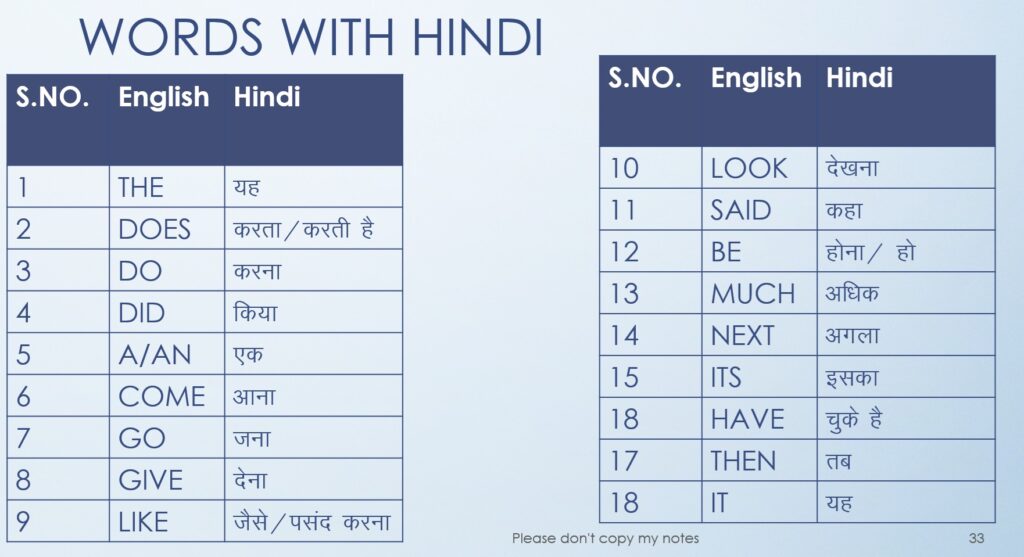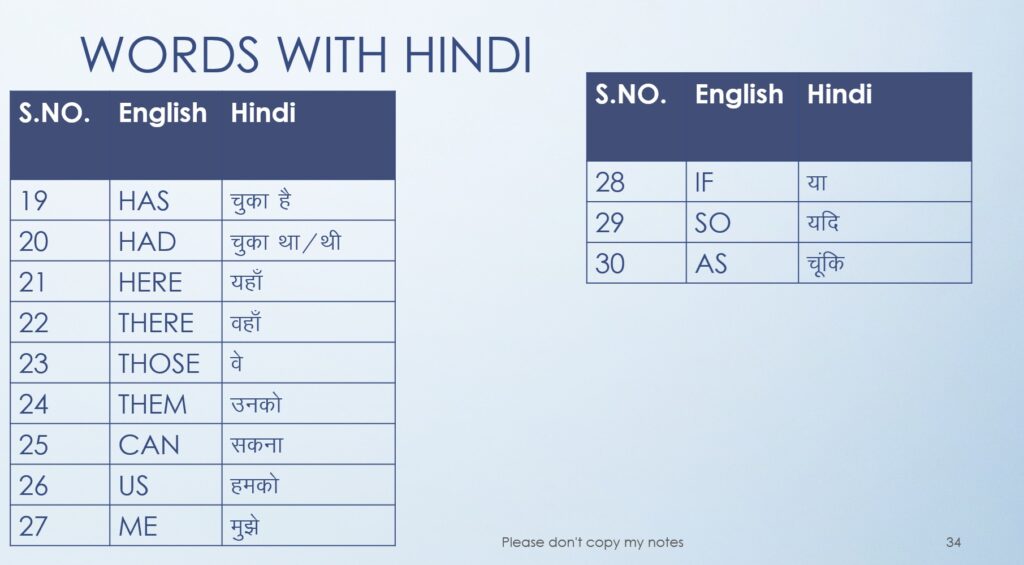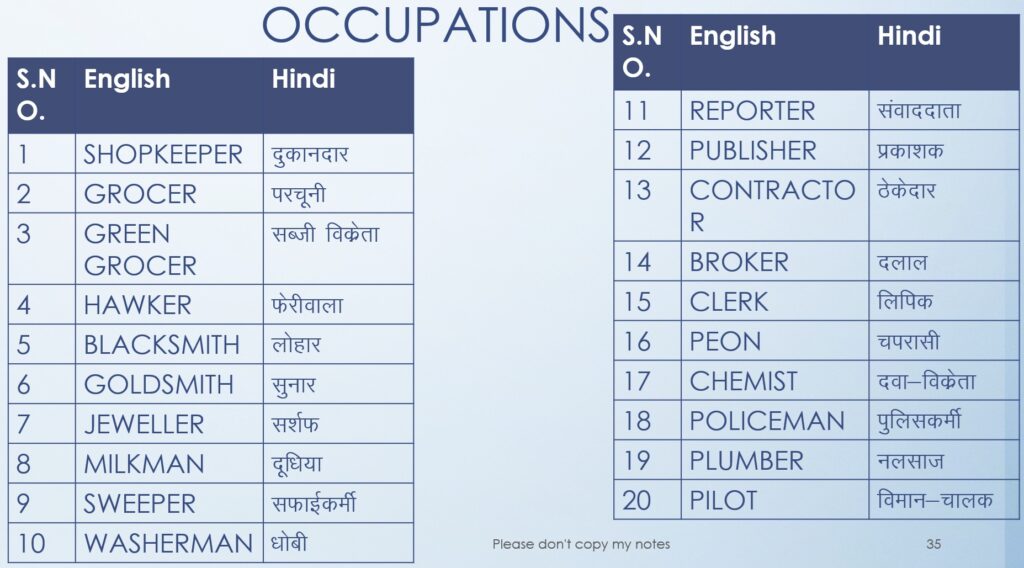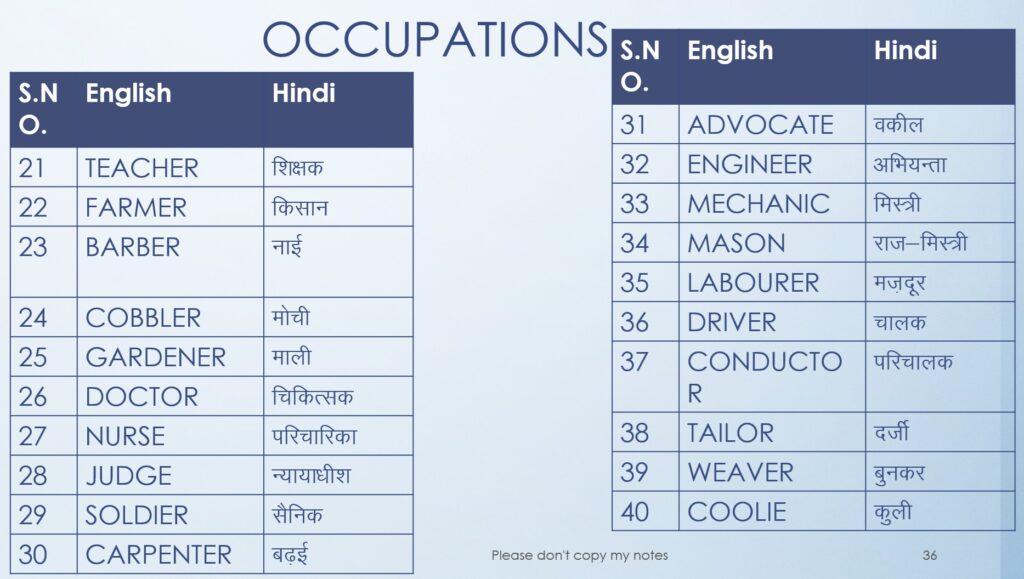
यहाँ पर आपको MS-Word के सभी मिलेंगे अगर आप इन सभी प्रश्नों का नियमित अभ्यास करते हैं, तो आपका MS- Word में कोई भी प्रश्न नहीं छूटेगा-
All Important Questions of MS-Word-
1. How to change Font Name?
➡️ Select the text → Go to Home tab → Font group → Font box → Choose the desired font such as Times New Roman, Calibri, Arial, etc.
2. How to change Font Size?
➡️ Select the text → Go to Home tab → Font Size box → Choose the size (for example, 12, 14, 16, etc.).
3. How to apply and remove Bold, Italic and Underline effect?
➡️ Select the text → Go to Home tab → Font group →
Click B to make text Bold.
Click I to make text Italic.
Click U to Underline text.
➡️ Click again on the same buttons to remove the effects.
4. How to apply and remove Strikethrough effect?
➡️ Select the text → Go to Home tab → Font group → Strikethrough (abc with line) → Click to apply or remove.
5. How to apply and remove Subscript?
➡️ Select the text → Go to Home tab → Font group → Subscript (X₂) → Click to apply or remove.
6. How to apply and remove Superscript?
➡️ Select the text → Go to Home tab → Font group → Superscript (X²) → Click to apply or remove.
7. How to change Case? (Sentence Case, Upper Case, etc.)
➡️ Select the text → Go to Home tab → Font group → Change Case (Aa icon) → Choose any one:
Sentence case
lowercase
UPPERCASE
Capitalize Each Word
tOGGLE cASE
8. How to change Font Colour of Text?
➡️ Select the text → Go to Home tab → Font Color (A icon) → Choose a color from the palette.
9. How to Highlight Text with different colours?
➡️ Select the text → Go to Home tab → Text Highlight Color (marker icon) → Choose a highlight color or “No Color” to remove.
10. How to apply and remove Shadow and Reflection effect?
➡️ Select the text → Go to Home tab → Text Effects (glowing A icon) → Choose Shadow or Reflection → Click again to remove.
11. How to apply and remove Bullets and Numbering?
➡️ Select the text → Go to Home tab → Paragraph group → Bullets or Numbering icon → Click to apply or remove.
12. How to align Text?
➡️ Select the text → Go to Home tab → Paragraph group → Choose one of the following:
Align Left
Center
Align Right
Justify
13. How to change Line Spacing of Text?
➡️ Select the paragraph → Go to Home tab → Paragraph group → Line and Paragraph Spacing icon (↑↓) → Choose 1.0, 1.5, 2.0, etc.
14. How to increase and decrease Indent of Text?
➡️ Go to Home tab → Paragraph group → Click Increase Indent or Decrease Indent buttons.
15. How to apply different Borders effects on Text?
➡️ Select the text → Go to Home tab → Paragraph group → Borders icon → Choose type of border (Bottom, Box, Top, etc.).
16. How to Replace Text? (VVI)
➡️ Go to Home tab → Editing group → Replace option →
Enter the word to find and the word to replace with → Click Replace All or Replace.
17. How to insert Pictures in the document?
➡️ Go to Insert tab → Pictures → This Device / Online Pictures → Select the picture and click Insert.
18. How to insert different Shapes in the document?
➡️ Go to Insert tab → Shapes → Choose any shape → Click and drag on the page to draw.
19. How to insert different SmartArt in the document?
➡️ Go to Insert tab → SmartArt → Choose a layout like Process, Cycle, or Hierarchy → Click OK.
20. How to insert different Charts in the document?
➡️ Go to Insert tab → Chart → Choose a chart type (Column, Pie, Line, etc.) → Edit data in the Excel sheet that opens.
21. How to insert and remove Hyperlink in Text? (VVI)
➡️ To insert: Select the text → Go to Insert tab → Link / Hyperlink → Type web address → Click OK.
➡️ To remove: Right-click on the link → Select Remove Hyperlink.
22. How to insert and remove Header and Footer in the document?
➡️ Go to Insert tab → Header or Footer → Choose a style → Type text.
➡️ To remove: Insert tab → Header → Remove Header (same for Footer).
23. How to insert Text Box in the document?
➡️ Go to Insert tab → Text Box → Choose a built-in text box or draw manually.
24. How to apply and remove Drop Cap in the document?
➡️ Go to Insert tab → Drop Cap → Choose Dropped or In Margin → Click OK.
➡️ To remove: Go to Insert tab → Drop Cap → None.
25. How to insert different Symbols in the document?
➡️ Go to Insert tab → Symbol → More Symbols → Choose the required symbol → Click Insert.
26. How to apply and remove Watermark in the document?
➡️ Go to Design tab → Watermark → Choose any design or create a custom one.
➡️ To remove: Go to Design tab → Watermark → Remove Watermark.
27. How to change the Page Colour?
➡️ Go to Design tab → Page Color → Choose a color from the palette.
28. How to apply different Texture in the Page?
➡️ Go to Design tab → Page Color → Fill Effects → Texture tab → Select a texture and click OK.
29. How to apply Page Borders?
➡️ Go to Design tab → Page Borders → Borders and Shading box → Choose border style, color, and width → Click OK.
30. How to apply Artistic Page Border?
➡️ Go to Design tab → Page Borders → Art box → Choose an artistic border → Click OK.
31. How to change the Margin (Left, Right, Bottom) of the Page?
➡️ Go to Layout tab → Margins → Custom Margins → Enter values for Left, Right, Top, and Bottom → Click OK.
32. How to change Page Orientation?
➡️ Go to Layout tab → Orientation → Choose Portrait or Landscape.
33. How to change Page Size? (A4, Letter, etc.)
➡️ Go to Layout tab → Size → Choose page size like A4, Letter, or Legal.
34. How to split all the text into different Columns?
➡️ Go to Layout tab → Columns → Choose Two, Three, or More Columns → Click OK.
35. How to Group and Ungroup?
➡️ Select multiple shapes or objects → Go to Shape Format tab → Group → Group.
➡️ To Ungroup: Shape Format tab → Group → Ungroup.
36. How to check Spelling and Grammar mistakes?
➡️ Go to Review tab → Spelling & Grammar → Word will show corrections → Apply changes as needed.
37. How to view the document in Read Mode View?
➡️ Go to View tab → Read Mode → Document will open in reading layout.
38. How to Zoom the document? (125%, 75%, etc.)
➡️ Go to View tab → Zoom → Choose percentage → Click OK.
➡️ You can also use the Zoom slider at the bottom-right of the window.
39. How to apply Gridline View?
➡️ Go to View tab → Show group → Tick Gridlines to display or remove gridlines.
40. How to view the document in Draft View?
➡️ Go to View tab → Draft → Document will switch to Draft layout.
41. How to view the document in Outline View?
➡️ Go to View tab → Outline → Document appears in Outline form.
अब आपको MS-Excel के सभी मिलेंगे, यदि आप इन सभी प्रश्नों का नियमित अभ्यास करते हैं, तो आपका MS- Excel में कोई भी प्रश्न नहीं छूटेगा-
All Important Questions of Excel-
=MIN(A1:A10) and press Enter.=MAX(A1:A10) and press Enter.=AVERAGE(A1:A10) and press Enter.अब आपको MS-Power Point के सभी मिलेंगे, यदि आप इन सभी प्रश्नों का नियमित अभ्यास करते हैं, तो आपका MS- Power point में कोई भी प्रश्न नहीं छूटेगा-
All important questions of MS- Power Point
(Uppercase, lowercase, capitalize each word, toggle case)
(Left, Center, Right, or Justify)
(Slide Sorter, Notes Page, Slide Master, etc.)
1.If you set a goal for yourself and in the due course of time you find it difficult to achieve your goal. what will you do?
Change your goal
Get stressed
2.Split it into smaller and achievable targets
Long term goals are –*
very hard to achieve.
the major targets in your life
very expensive to achieve
3.Sadness, anger, boredom, irritation and many similar feelings are dangerous and should be nipped in the bud instantly as —–
*
they are risky.
they are not good emotions.
they help negativity to increase in you
4.Carefully and attentive listening is an essential part of developing effective interpersonal skills*
Agree
Disagree
5.Leena has to attend a mix of clients. She should —–*
put on high heels
use gaudy make up
dress up decently
6.Carefully and attentive listening is an essential part of developing effective interpersonal skills*
Agree
Disagree
7.A presentation satisfies the prime need of __________ on various subjects between either two people or a group of people
*
Argument
Investigation
Communication
8.Taking responsibility for your actions is a major factor when it comes to workplace ethics. This is——
Positive behavior
Responsibility
Accountability
9.____________ is the most important component of making successful presentations.
Narration
Preparation
Communication
When you join a new friend circle, there is nothing wrong in —
*
Hiding your likings.
Proudly presenting your talents
Not required as you do things as you wish
10.Ashok speaks well but doesn’t want to express himself in a group. This means—
he needs to think about his problems
he has to overcome his fear.
he needs to work on interpersonal skills and confidence.
11.Jealousy makes the person —
Incapable of appreciating good in other
Capable of appreciating others
Loving
12.if a team leader communicates positively with his team mates and gets the work done effectively, the person has………
*
good vision
The power to make people work for him/her.
Good interpersonal skills.
13.To identify negativity in you–
Neglecting your weakness
Hide your weakness from your friends
Speak about your weakness with your friends.
14.Meena saw her colleague’s mailbox open when her colleague was not in her place. What should be Meena’s reaction to this?
Meena should inform this to her colleague on her return.
Meena should check her mailbox
Meena should inform this to other staff members and make them check her maikbox
15.You visit a dam with your friends. You see there warning signs on the banks of the dam stating that swimming is prohibited. One of your friends suggests that you should take a dip in the water and play some water games. You would…..
Go to dam and swim
Stop your friends from going to swim
Both
16.Making right decision means—
Taking most easy decision.
Taking decision on right time
Selecting appropriate alternative from the available alternatives.
17.Spending some time in planning your day is___
A waste of time
Good as it enables you to utilize the available time productively
Not required as you do things as you wish
18.Short term goals can be accomplished in —
in a short life.
in a year
in few minutes.
19.Procrastinating or neglecting responsibilities at workplace shows –
lack of motivation.
lack of positive attitude.
lack of courage.
20.You make way for the ambulance and fire engines when you drive. This indicates–
You do not follow the traffic rules
you are forced to follow the traffic rules
You are aware of your responsibilities
21.In the organization, there is a collective responsibility of completing a given job in a specific time. This is broadly called a…..
Plan
Vision
Goal
22.Changing with circumstances and conditions in our lives and adapting to the change is a skill. Is thistrue? If yes, how? If not, how it is not a skill?
Changing and adapting to the change is certainly a skill. The reason is that we are always with people of different characters, choices, preferences. This truth and other factors keep bringing change to our lives forever. To adjust/adapt to all that requires a capability, a skill. Therefore adapting to changing circumstances is a skill.
We must resist change because it invites friction or conflict. That does not improve our chances of promotion. We may feel bad or sad about change but we cannot change.
It is wrong to say that adapting to the change is a skill. The reason is that only if the change is such that we can adjust to it, then it is possible to adapt. Also sometimes other people must also change and adapt. We don’t have to change and compromise or adjust all the time.
Adapting successfully and quickly to the change is a wise thing to do. That is not a skill. To be able to do that our nature must be understanding and generous. Being rigid and aggressive does not help.
23. Sneha doesn’t like the feedback given by her teacher on her dressing style and started crying. This indicates………
She dislikes the teacher
She needs to work on accepting feedback positively
she feels ashamed of herself
24.You do not try to please everyone all the time indicates that
You know your abilities
You know your unabilities
25.Preparing a to do list helps you to…….
Prioritize your task as per the available time
Hand over the tasks
know your pending tasks
26.…………………is the most important component of making successful Presentation.
Preparation
Narration
Communication
27.Dinesh has habit of nail biting when some unexpected problem arise. This indicates that…
he takes stress very easily
he is week
he takes everything positively
28.In a group discussion, you should be flexible, but ….
you must not put forth what you want to say
you must put forth what you want to say
you must not think about it
29.I can not do what I or other’s expect because the expectation are unrealistic. This indicates ….
Pessimistic attitude
Optimistic attitude
Unrealistic attitude
30.After assigning priorities of things to be done, what should you do?
Delegate your responsibility
Start doing the activity
Allocate specific time to each activity/ task
31.sameer calls his friend and relatives frequently when he is an office. This Indicate That ….
he like to speak on phone very much
he is misusing the company time
32.In a presentation, you should accept different vies of different people. This shows your…
Openness for criticism
Positive attitude and positive acceptance of critical feedback
1.I …… like to watch TV. There is good film on.*
Would
Went
was
Red
2.Those girls always ….. to loud music
Listens
Listen
Listening
3.My friend Anita ……. Sports
Loved
Loves
Love
4.Tell me ….. you coming to the party?
Are
is
am
5.The swimming pool… at 7:00 in the Morning
Opens
Open
6.The heritage property is always the …… hotel to stay in.
Most luxurious
More luxurious
luxurious
7.Which is the correct sentence?
He feels terrible if he usually loses his temper.
He usually feels terrible if he loses his temper.
8.Good Students always …… their homework.
Do
Does
Done
9.Good Students always …… their homework.
Has
Have
Having
10.What ….. she do in her free time.
Does
Done
Doing
11.Somebody most ….. taken my cellphone.
Has
Have
was
12.Where ….. they go yesterday?
Does
did
done
13.You are ……. Person I have ever seen in my life.
The meanest
Meaner
More mean
14.These colors are the ….. I have ever seen.
Not amazing
les amazing
most amazing
15.Which is the correct sentence?
We always watch television in the evening.
We watch television in always the evening.
16.The Taj was…. Than the holiday inn.*
Expensive
more Expensive
most Expensive
17.Ramji is a …. Gardener than Santosh.
Good
BETTER
BEST
18.Look at …… newspaper here.
This
These
19…….. Big building over there is the parliament.
these
that
those
20.Fill in the blank with correct option so that this becomes an order: don’t ………… football in the yard.
Play
played
playing
21.Please visit our website for…. Details.
Most
many
more
22.My son …… a video game for his birthday.
Likes
Would like
23Anita …. Tennis very well.
Play
plays
24.I ….. Lions and Tigers very much.
Taking
take
Takes
25.Are ……… your pencils in this box.
These
this
that
26.They … to buy a house but they haven’t got enough money.
Would like
like
27.She has never……. Something like that before.
done
do
28.Fill in the blank with correct option so that this become in order: ……..up stairs.
Going
gone
go
29.Fill in the blank with correct option so that this become in order: don’t ……. In this lake.
Swimming
swim
swims
30.I ….. to have a car.
Would like
like
31.Mike …… children very much.
Would like
Likes
32.She …… playing tennis.
would like
likes
33.Fill in the blank with correct option so that this become an order: don’t ….. late for school.
is
am
be
34.I never …….. Coffee.
Drinks
Drink
Drinking
35.What …. You do every Sunday?
Do
did
does
36.Ann …… to work for this company.
Would like
like
37.I …. To eat a pizza tonight.
like
would like
38.Bad driving …….. many accidents.
Causes
Causing
Cause
39.Fill the blank with correct option that this become an order: ….. your teeth.
Brushing
Brush
40.I …. Hungry.
am
are
41.My students ………….. a little English
Speak
spoken
42.How much ….. it.
is
are
43.You ……. Reading non-stop for hours so you must be very tired.
Have been
Having been
44.They …. Finished the job.
Has
Have
45.They ….. help you.
was
will
प्राथमिक दस्तावेज़-प्रबंधन (New, Open, Save, Print आदि)।
मुख्य बातें:
सबसे ज़रूरी और रोज़मर्रा के टूल्स — टेक्स्ट फॉर्मैटिंग, पेस्ट, क्लिपबोर्ड, एलाइंमेंट, सैल स्टाइल।
मुख्य समूह:
पहला-दर्ज़े के ऑब्जेक्ट डालने के लिए:
प्रिंट और पेज डिज़ाइन से जुड़ा:
सभी फ़ंक्शन और फ़ॉर्मूला-टूल्स:
डेटा इम्पोर्ट, साफ़-सफाई, फिल्टर और एनालिसिस:
जांच-परख और सुरक्षा:
वर्कशीट देखने और विंडो सेटिंग्स:
(डिफ़ॉल्ट रूप से छुपा होता है — Options → Customize Ribbon से दिखाएँ)
— आसान हिन्दी गाइड
1.File Tab
नया दस्तावेज़ बनाना, सेव/Save As, प्रिंट करना
2.Home टैब — टेक्स्ट सजाने का मुख्य स्थान
1.Clipboard (कट/कॉपि/पेस्ट)
2.Font (फ़ॉन्ट सेटिंग्स)
1.Font family (Calibri, Times New Roman इत्यादि) बदलें।
2.Font size (12, 14, 18…) चुनें।
3.Bold (Ctrl+B), Italic (Ctrl+I), Underline (Ctrl+U)।
4.Text color, Highlight (marker) और Strikethrough।
5.Clear All Formatting (फ़ॉर्मैट मिटाने के लिए) — छोटा बटन दिखेगा।
3.Paragraph (पैराग्राफ फॉर्मैट)
1.Alignment: Left, Center, Right, Justify।
2.Bullets और Numbering: Lists बनाना।
3.Line spacing: 1.0, 1.5, 2.0 आदि बदलना।
4.Increase/Decrease Indent, Sort, Show/Hide ¶ (format marks)।
5.Borders and Shading: टेक्स्ट के चारों ओर बॉर्डर या पृष्ठभूमि जोड़ें।
4.Styles (स्टाइल्स)
1.Predefined styles जैसे Normal, Heading 1, Heading 2 आदि।
2.Heading स्टाइल उपयोग से आप बाद में Table of Contents आसानी से बना सकते हैं।
3.अपनी स्टाइल बनाकर Apply कर सकते हैं (right-click → Modify)।
1.Find (Ctrl+F) — टेक्स्ट खोजें।
2.Replace (Ctrl+H) — शब्द बदलें।
3.Select — पूरा डॉक्यूमेंट या कुछ भाग चुनना।
3.Insert टैब — जोड़ने योग्य चीजें
4.Design टैब -पूरे दस्तावेज़ का लुक बदलें
Themes, Colors, Fonts बदलकर पूरे दस्तावेज़ का लुक बदलें।
Watermark और Page Color, Page Borders यहाँ से सेट करें।
5.Page Layout पेज का मार्जिन (किनारे), पेज साइज जैसी सेटिंग्स आती हैं।
1.Margins (सामान्य, संकुचित, कस्टम)।
2.Orientation: Portrait / Landscape।
3.Size: A4, Letter आदि।
4.Columns: News-style कॉलम बनाना।
5.Breaks: Page break, Section break — अलग सेक्शन के लिए जरूरी।

कैलेंडर डिज़ाइन (Calendar Template)
📌 उपयोग: स्कूल, ऑफिस शेड्यूलिंग
Youtube channel:-https://www.youtube.com/channel/UCev6X7s2eQULqz5ILAUx-BQ
Instagram id:-https://www.instagram.com/erbadshahraushan?igsh=Y3ZyYWY4YTZ5ZXU=